News
Every release, newest first.
24 November 2026 · v4.0.2
Another fix round: dormers no longer stand in the room below, a garage roof stops at the house wall, the surroundings from the map lie on solid ground, and a card can have its own start view for a screen held upright. As always, it runs on older wall tablets too.
New
- A start view for a screen held upright: a card may have a second start view,
start_view_portrait, beside start_view. Turning the tablet moves the house view to the one that fits; without the line nothing changes (idea and proposal: bpaludo, #1228).
Fixed
- A camera's view cone over a small step in the ground – a terrace a few centimetres above the lawn, a path beside a bed – showed a jagged pale strip along that edge: the cone ran slanting through the step. It is now cut along the edge and lies flat on each side (#1115, reported by RobertSorgenfrei).
- A low roof beside a higher storey ran on through the house – a garage's roof next to the upper floor, say: as soon as its width lay within the length of the roof above, it was taken for a wing of that roof, drawn on to its ridge line and lost its overhang. A roof whose ridge stays below the other roof's eave now ends at the wall under it (#1280, reported by TRusselo).
- A hedge, fence or pergola lifted by a height offset grew into a solid block down to the ground since 4.0.1. Lifted by hand it keeps its underside where it was put; only standing on the ground it reaches into a falling lawn (#1303, reported by murilokasper).
- A door in a free wall along the house's outside swung and hung the other way round in the plan than in 3D when the wall was drawn with the rooms on its right: 3D takes the side with the rooms as inside, the plan took the side as drawn. The plan (and the camera spot of the lock) now agree with 3D (#1225, reported by Atomiiik).
- A wall painted dark blue turned grey in the homely styles, or grey in a band where it is shaded (
#254369, say): a rule that turns dark navy leftovers of the neon look neutral took the wall's own colour for one. Walls are left out of it (#1306, reported by AxelBlomTH).
- A thin line across the whole 3D picture under the real sky, most visible at night: the sky above the horizon and the haze below it are two fills, and where they met between two pixels the background showed through. They now meet on a whole pixel (#1305, reported by murilokasper).
- A towel radiator from the bath pack glowed only as a narrow strip on its top with a "state from" entity, and not at all on a switch alone. It now glows warm on the wall behind it, all over – with either (#1311, reported by milandrzej). Other flat pack items on the wall glow behind them too instead of on their top edge.
- Full screen on a phone: a card in the phone view has no full-screen button, but while the page loaded it showed for a moment – tapped then, there was no way back. In full screen the button now stays there too (#1261, reported by 1970lexi).
- A robot vacuum with maps of several floors drove its lanes on its dock's floor while it cleaned on another one. It now cleans on the floor of the room it reports – unless that floor has a dock of its own for the same vacuum (idea and proposal: akobza, #1132).
- A robot vacuum in a U- or L-shaped room drove straight through the wall to its first lane when 3D opened while it cleaned. It now appears at the lane, as a robot reported in another room does (idea and proposal: bscholer, #1210).
- A dormer's side walls stood in the room below as dark slabs, through the bed, when the dormer is wider or deeper than the room's bay under it: they were built from the roof's base up. They now stand on the slope, as on a real house (#1315, reported by Atomiiik).
- A room listed the power of another room's lamp – the bathroom lamp's meter in the office and the hallways: with several lamps on one device (an actuator with many channels) and PowerCalc meters named after the lamps' names, every lamp drawn as furniture took the device's first meter. Each lamp now takes the meter that carries its name, and none when it has none of its own (#743, reported by daene85).
- A long press on an add-on's marker (the heat pump's status, say) opened Home Assistant's details for
module:…, an entity that does not exist. It now does what a tap does (#1314, reported by Atomiiik).
- The sky showed through the ground of the surroundings in the homely styles, wherever the map knows no area between streets and lawns – blue by day, pink in the evening. A plain ground now lies under the whole map; it leaves out what the plan draws below the ground (a pool, a lowered drive, the floors below). The neon looks keep their grid (#1320, reported by MarkTu75).
- Slovak: 25 texts corrected – grammar, typing errors and the informal address throughout (Bearstorm, #1100).
- A terraced house and the surroundings from the map: the map often keeps the whole row as one building, which NeonPlan hides as your own house – so the row was missing, and shown by hand (⚙ Settings → Surroundings → Show and hide houses) it stood as a block through the house. Shown by hand, it now leaves out what the plan builds there: the neighbours' houses stand to the left and right of yours. Nothing changes unless you tap it.
22 November 2026 · v4.0.1
A fix round after 4.0: the phone's list no longer calls a closed garage door open, a second plan stops flooding the Home Assistant log, and thin things on the wall are as thin as the plan says.
Fixed
- A closed garage door counted as open in the phone's list "What is going on?", and an open one did not: its reading was taken the wrong way round (#1261, #1276).
- A view of a second plan flooded the Home Assistant log ("invalid_format" at
view.plan), and that screen got no announcements or voice answers (#1242).
- Socket, light switch and sensors on the wall stood 5 cm out of it in 3D while the plan showed them thin. A socket is its 1.4 cm again, and a sensor can be made thinner by hand (#1236).
- A hedge, fence or pergola on falling ground showed its underside: it now reaches down into the lawn below it (#1262).
- Cupboard fronts stayed dark blue under a zoom style while the house around them was already homely (#1259).
- The house's shadow was missing on a dashboard card with a heatmap (#1196).
- A finger on a label, a pin or a glass card turns the house like a finger on free picture. On an Android phone the browser took such a sideways move for its "back" swipe and the dashboard came up instead (#1248).
- The mouse turns and zooms over markers too: the wheel over a pin, a room name or a glass card zooms the house, and a drag that begins there turns it (#1271).
- The way out of full screen stays: the ✕ no longer disappears with the card's other buttons, so a card in full screen cannot trap you.
- The plan list says why the main plan has no bin instead of leaving the row empty (#1258).
- Pack "Digital picture frames": the content of a standing frame sat on its back instead of on the front (#1264). The corrected pack comes as an update from the shop.
Thanks to Atomiiik, beta-j, Skeletitor, murilokasper, Habi01H, daene85, erwinsnl, netrunnercs, michaelbell1981, RiotEd, snurre0, 1970lexi, K3ngur and blitzwurst for the reports.
How to update: Settings → System → Updates (Home Assistant before 2026.11: HACS → NeonPlan 3D → ⋮ → Update information → Download), restart Home Assistant, then Ctrl+F5.
Runs on old wall tablets as always. Found a bug? Please open an issue on GitHub.
20 November 2026 · v4.0.0
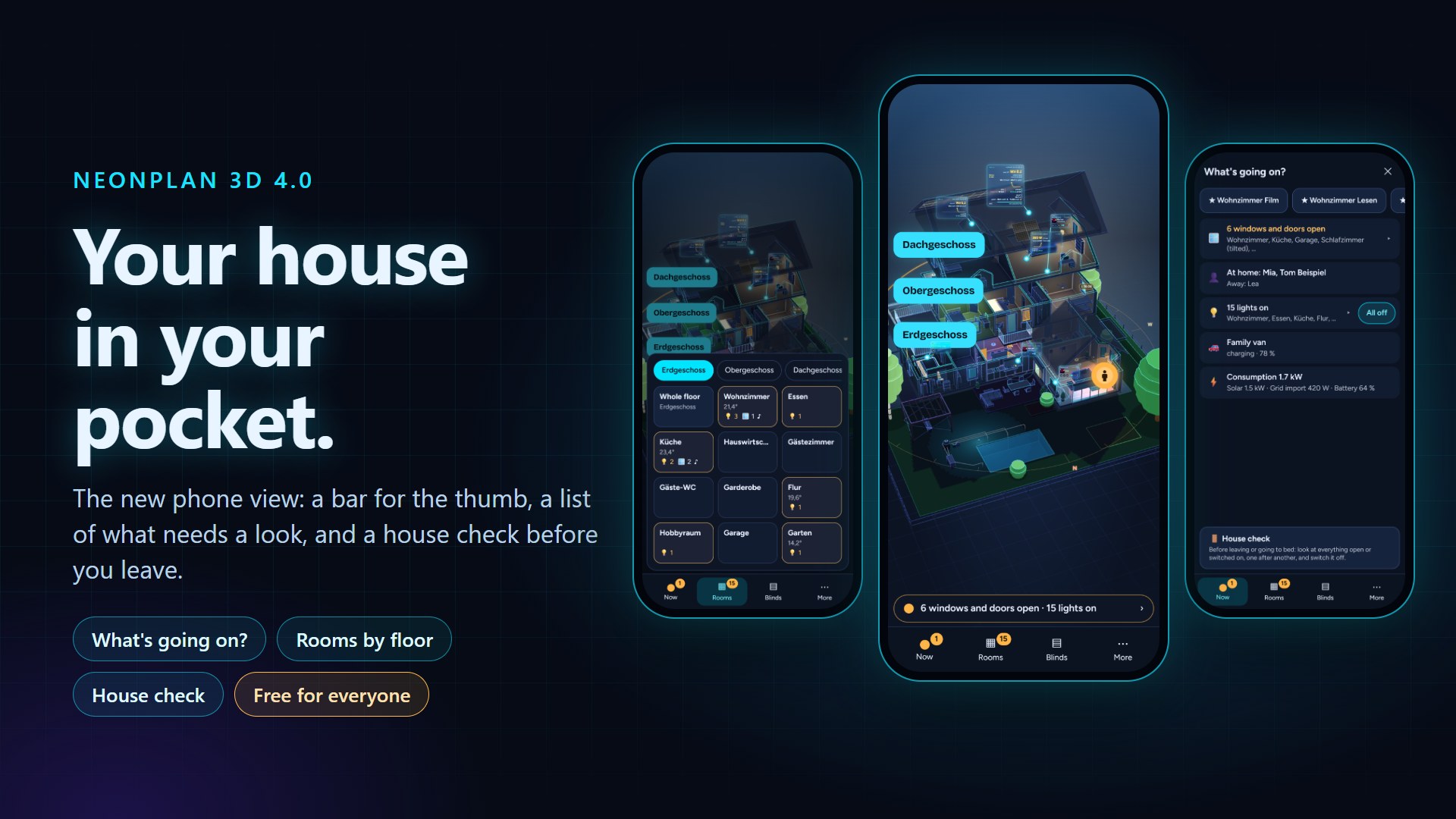
NeonPlan 4.0: your house in your pocket. A view made for the thumb, with a bar at the bottom, a list of what needs a look, and a card editor of its own for phones. Everything in this release is free.
New
- Phone view: the house without header and loose buttons, and a bar at the bottom – Now (what needs a look, with a green, yellow or red dot), the rooms by floor as tiles with temperature, lights, open windows and music, the blinds of the house, and More (search, house check, whole house, room on its own). Your phone asks once whether you want to try it; tablets and PCs stay exactly as they are.
- "What is going on?": warnings, open windows and doors, unlocked doors, who is at home, the household, lights on, cars and energy – the urgent first, and "All is well" when nothing needs a look. A tap on a line shows the place in the house; "All off" and "Lock" stand right beside their lines.
- House check: before leaving or going to bed, NeonPlan steps through every open window, unlocked door and lit room and shows each one in the house.
- Phone view in the dashboard card:
phone: true. The card form asks what the card is for – a tablet / large screen or a phone – and shows the options that fit.
- Design the bar yourself: leave the rooms, the blinds or the favourites out, open with the list, and add up to two places of your own – all lamps or all thermostats by floor, a scene or script, or a page of a dashboard.
- From a notification straight to the place:
/neonplan3d?view=now, ?room=… and ?show=<entity> open NeonPlan at the list, a room or a device. The manual has an example for the Companion app.
- Card option
surroundings: false: this card draws the house without the surroundings from the map.
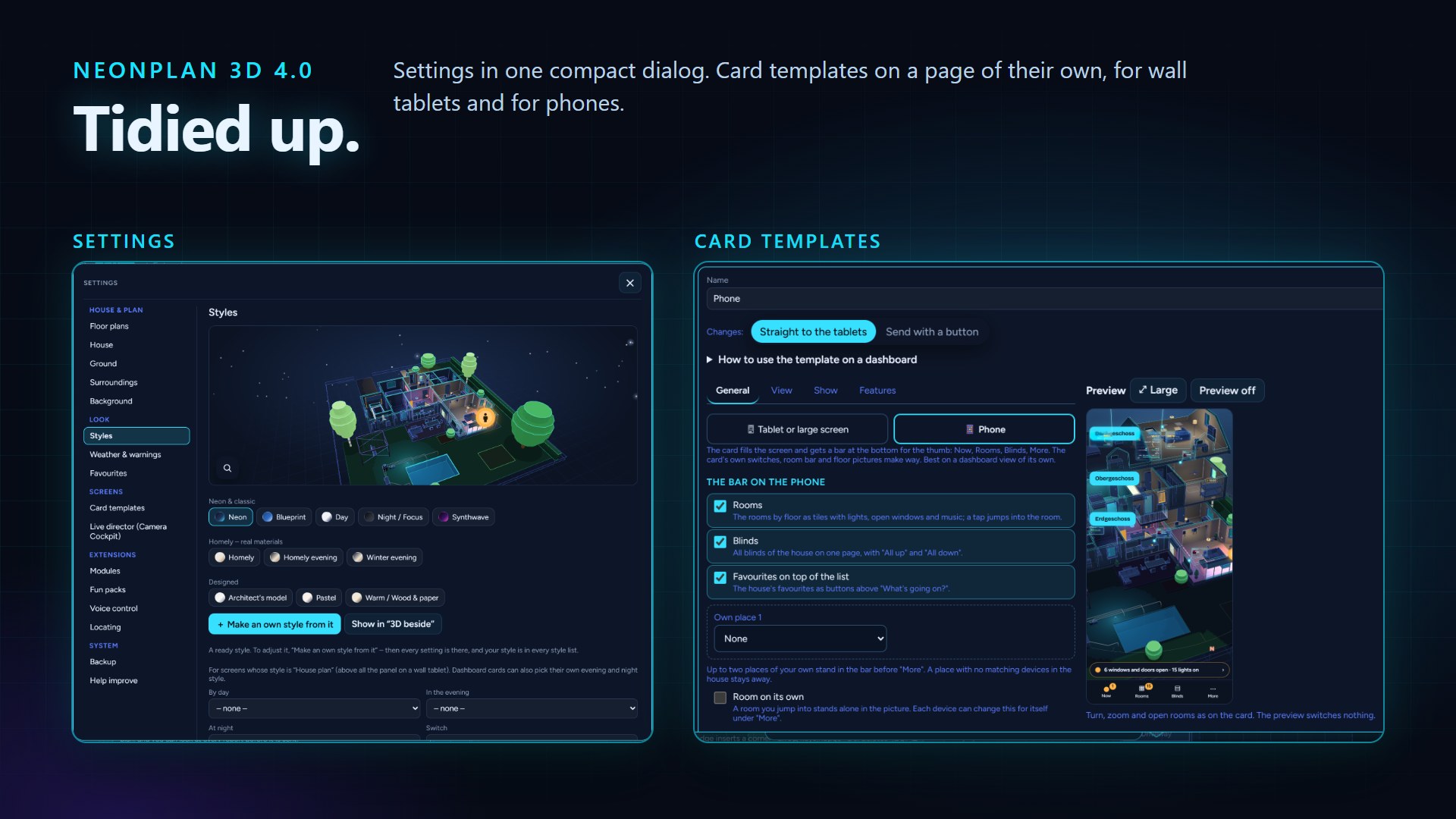
- Card templates as a management page: your templates on the left by screens and phones, the form in tabs, the preview on the right. The preview turns, zooms and opens rooms like the card and switches nothing.
- ⚙ Settings tidied up: one dialog instead of a list of sixteen entries – the topics in five groups on the left, the chosen topic on the right. Nothing was removed, every topic's content is unchanged.
Fixed
- Restoring a full backup with many packs failed with "not a plan". A large backup is now restored in pieces (#1213).
- Furniture and stairs from packs disappearing from the view when loading the packs had failed once (#1229).
- An LED strip without a height of its own hangs under its room's ceiling (#1226).
- "Rooms overlap" names the rooms and selects the first one (#1195).
- A tap on a blind on an Android phone could still move it instead of opening its menu (#1208).
- Surroundings from the map with a radius of 150 m or more could fail to save ("value must be at most 60"): a way mapped wider than 60 m is now kept at 60 m (#1234).
Thanks to RoyalPineapple, skywalker0403, ManuelHecht, KlausKanda, Atomiiik and TumblerP85D for the reports.
How to update: Settings → System → Updates (Home Assistant before 2026.11: HACS → NeonPlan 3D → ⋮ → Update information → Download), restart Home Assistant, then Ctrl+F5.
Runs on old wall tablets as always. Found a bug? Please open an issue on GitHub.
19 November 2026 · v3.5.2
A small round after 3.5.1: the neighbours' houses can wear a gable roof, and fixes for duplicating a floor, blinds on a phone, the house shadow on a card, roofs over an attic and camera view cones.
New (free)
- Neighbours' houses with a gable roof (option): ⚙ Settings → Surroundings → Neighbours' houses with a gable roof. The houses from the map get a simple roof with the ridge along their longer side instead of a flat top; halls, blocks of flats and winding buildings stay blocks. Off by default (#1109).
Fixed
- Duplicate floor failed to save when a piece of furniture on the floor had "Only show while …" set. Plans that already hold such an empty condition are healed when loaded (#1217).
- A tap on a blind on a phone could move it instead of opening its menu: a tap with a shaky finger counted as a swipe (#1208).
- House shadow on a dashboard card of a house with one floor was missing (#1196).
- A roof that begins at a floor's own level no longer draws gables of its own in front of the attic's outer walls, windows and doors (#1199).
- Camera view cones at a step (a terrace above the drive) no longer hang down the step as a curtain; a camera right at such an edge lays its cone flat on the ground below (#1167, #1115).
- Zooming with two fingers in the house view: fingers on a floor's label, a pin or a glass card count for zooming too – on a phone or a small tablet the house could often be turned but not zoomed.
- Glass cards all over the picture after an announcement's speaker card went away.
- Editor dialogs no longer close when you mark a text with the mouse and let go outside the dialog.
- A smart plug with a power sensor on a piece of furniture: the watts decide whether it glows and counts as running, as "Running from (watts)" says. Without a power sensor nothing changes.
Home Assistant's Marketplace / HACS installs NeonPlan from the release zip again, which is faster than loading every file on its own.
Thanks to Sepp70, Atomiiik, michaelbell1981, maecius2, 1970lexi, RobertSorgenfrei and frops83 for the reports and the idea.
How to update: Settings → System → Updates (Home Assistant before 2026.11: HACS → NeonPlan 3D → ⋮ → Update information → Download), restart Home Assistant, then Ctrl+F5.
Runs on old wall tablets as always. Found a bug? Please open an issue on GitHub.
18 November 2026 · v3.5.1
A fix round after 3.5.0: the fly-in switch where you look for it, the real sky over the map, the sun effects back on, and fixes for dormers, turned walls, ceiling lamps, blinds and wallboxes.
Fixed
- Fly in from space can now be switched on in the editor too: Settings → Weather & warnings, right below Real sky (in the 3D view also under ☆ → ⚙ Settings) (#1193).
- Real sky with the surroundings from the map: sun, moon and clouds stand over the neighbourhood instead of between its streets and under its roads (#1203).
- Sun arc and house shadow gone after the update: a safety net switched them off by mistake when a slow device was moved to the tablet level in the first seconds. With 3.5.1 they come back by themselves (#1196).
- Ceiling lamps from packs no longer shimmer through the floor above and can no longer be switched from there (#1191).
- Turned rooms: their outer walls turn to glass at their own angle, like the walls of the house beside them (#1189).
- Dormers: a dormer whose front reaches down low no longer stands as a box over the floor below in that floor's view; in a floor view a dormer's walls only stay over an attic (#1167).
- Camera view cones of a camera right at a step (a terrace edge) no longer run down it (#1167).
- Swiping a blind in the 3D view sends one position when you let go – the motor no longer works through every step in between for a long while.
- Wallbox: states such as "not charging", "ready to charge" or "disconnected" no longer show as charging or plugged in.
- Live Presence: the room sensors keep the room in Home Assistant's history, no longer every small change of the probability.
Thanks to PetrMa, twynne, daene85, netrunnercs, ManuelHecht and 1970lexi for the reports.
How to update: Settings → System → Updates (Home Assistant before 2026.11: HACS → NeonPlan 3D → ⋮ → Update information → Download), restart Home Assistant, then Ctrl+F5.
Runs on old wall tablets as always. Found a bug? Please open an issue on GitHub.
17 November 2026 · v3.5.0
A real sky over your house, a flight in from space, three Pro add-on updates and a big round of fixes.
New
- Real sky: behind the house stands a sky that follows the real sun – sunset colours, the blue hour, stars that move through the night and the moon in its real phase. With Weather outside, clouds drift with the real weather. On by default, switch it off under ⚙ Settings → Real sky; on the Tablet level it is a still picture.
- Fly in from space (option): when the view opens, a neon globe turns to your home, a beam marks it and the camera comes down onto the house. Switch it on under ⚙ Settings → Fly in from space; a tap skips it.
- Carcass and fronts in their own colours: in the homely styles, cabinets, dressers and kitchens now have a Carcass colour next to Fronts. Until you pick one, the front colour colours the whole cabinet as before. Worktops take the wood colour, pack lamps their body colour.
- Mansard roofs: the pitch of the upper roof can be set in the roof section (Upper roof pitch, 5–60°); without a value it stays 30°.
New in the Pro add-ons (free updates for their owners)
- Kamera-Cockpit – People from cameras: a person, car or animal a camera sees stands as a figure on the plot; with Frigate right where it is and moving along.
- Klang & Kino – Music follows you: the music walks with you from room to room (Music Assistant); notes fly between the speakers.
- Haushalt Pro – Clean right here: tap a spot in the 3D view and the robot vacuum cleans exactly there (Roborock, Dreame, Xiaomi).
Fixed
- Walls beside windows and doors: the vertical strips beside every opening in the see-through walls are gone – with fewer triangles than before (#1182).
- Roofs: roof sections in one plane no longer show a joint with a wall underneath (#1184); a window in the wall below a dormer's front shows through again (#1185); with the floors pulled apart, the roof lifts clear of a loft inside it (#1169); a dormer's walls lift and fade with the roof again (#1167).
- Room panel: on Home Assistant 2026.11 a renamed entity shows its own name again, without the device name in front of it (#1181).
- Dashboard card: a
style_entity helper switches the style at once (#1170); own buttons with "navigate" lead back to the plan with ← (#1171); the walk button steps aside for a long button label (#1146).
- Editor: with Space held, a mouse drag always pans the plan and never moves what lies under the pointer (#1179).
- Camera view cones end where the ground drops away instead of running down a step (#1167).
- Energy Pro: PV comes from the strings when the inverter's sensor reads 0 while its strings deliver power; the editor says which sensor belongs to the inverter.
- Furniture colours: a blue front no longer turns grey on some faces (#1175). The pack updates that come with this release (they need 3.5.0) also fix the gaming chair, the extendable dining tables, the track spots and the standing mirror (#1175, #1177).
- Install and update help names the Home Assistant Marketplace, which took over from HACS in Home Assistant 2026.11.
Thanks to 1970lexi, Atomiiik, bpaludo, chrisns, daene85, Deninho91, ManuelHecht and Vatout57 for the reports.
How to update: Settings → System → Updates (Home Assistant before 2026.11: HACS → NeonPlan 3D → ⋮ → Update information → Download), restart Home Assistant, then Ctrl+F5.
Runs on old wall tablets as always. Found a bug? Please open an issue on GitHub.
16 November 2026 · v3.4.3
A small fix release for Klang & Kino.
Fixed
- Now-playing glass cards in an opened room: the card with cover, title and volume now shows in an opened room too. Before, a setting of Energy Pro hid every card there – and without Energy Pro it could not be switched on.
- Speaker symbols step aside for their card only while the card can show, so a symbol no longer vanishes with no card in its place.
Thanks for the detailed report by e-mail.
How to update: Settings → System → Updates (if it doesn't show: HACS → NeonPlan 3D → ⋮ → Update information → Download), restart Home Assistant, then Ctrl+F5.
Runs on old wall tablets as always. Found a bug? Please open an issue on GitHub.
16 November 2026 · v3.4.2
A fix release with one small new setting.
New
- Height of the surroundings: Editor → Surroundings → Height of the surroundings (m) moves the whole map up or down – for a street that lies higher or lower than your ground floor (a slope, a sloping drive). Default 0 (#1148, thanks daene85 and 1970lexi).
Fixed
- Dormers: a window under a dormer front shows completely – the wall under a dormer rises to where the dormer's front begins (#1156, thanks Sharkelli). The roof opens exactly at the dormer's edge, and a wall meeting a dormer steps up straight instead of slanting (#1145, thanks grzegorz914).
- Turned flat and parapet roofs: fairy lights, solar fields and roof windows turn with the roof (#1147, thanks AbortRetry).
- Roof windows on a flat roof show their glass and look into the room below (#1078, thanks michaelbell1981).
- An opening at a wall's end leaves nothing standing in the passage – no thin plate, no lines (#1158, thanks ManuelHecht for the precise analysis).
- "No wall" between two rooms shows in both rooms and can be undone from either; "no wall" on a short wall no longer removes the neighbour's whole long wall (#1151, thanks vincegre).
- Live parts of pack furniture (a dishwasher's door, drawers, status lights) follow their sensor right away; a wood finish colours the whole worktop of kitchen units, dishwashers and vanities (#1143, thanks frops83).
- Camera view cones lie on a raised terrace instead of running under it (#1115, thanks RobertSorgenfrei).
- Cards of single rooms keep the roof slopes and roof windows over the floors they show (#997, thanks RkcCorian).
- Turning the house keeps each floor's floor-plan picture under the rooms (#1124, thanks RkcCorian).
- Time travel → Overview → Day counts switches that drive a lamp as light (#1032, thanks abgestumpft).
How to update: Settings → System → Updates (if it doesn't show: HACS → NeonPlan 3D → ⋮ → Update information → Download), restart Home Assistant, then Ctrl+F5.
Runs on old wall tablets as always. Found a bug? Please open an issue on GitHub.
15 November 2026 · v3.4.1
A fix release – please update, it contains security fixes.
🔒 Security
- "Show people to admins only" now holds on the server. Other Home Assistant users get no person's whereabouts from questions ("Who is home?", "Where is …?"), and their views no longer receive the rooms to fly to (#1129).
- Ringing a phone works only for its own person or an admin, is sent with the caller's context, and one phone rings at most once in 30 seconds (#1130).
- Time travel returns only entities the user may read; statistics that belong to no entity only to admins (#1131).
Thanks to mariomurrent-softwaresolutions for the careful reports.
Fixed
- Energy Pro glass cards are readable in the bright styles (Day, Homely, Architect's model, Pastel, Wood & paper) – they get the darker glass of the module cards (#1126, thanks abgestumpft).
- Window light at night shows outside the house in desktop Chrome with a homely style (#1114, thanks moilolon); camera view cones no longer burn a light terrace to white (#1115).
- Surroundings from the map: streams, roads and fields reaching far beyond the chosen radius are cut at the neighbourhood – tap Load again once (#1121, thanks Habi01H).
- Turning the whole house by 90° turns the roof with it – ridges, roof windows and solar fields stay on their roofs (#1124, thanks RkcCorian).
- Located people stand inside their room – in an L-shaped room the figure stood in the hall next to it (#900, thanks cesp99-ux).
- Dormers keep their side walls and front gable when the roof fades over the attic.
- Old wall tablets and old Safari: the 3D view no longer stops where the browser has no
roundRect; time travel no longer floods the error reports.
Runs on old wall tablets as always. Found a bug? Please open an issue on GitHub.
15 November 2026 · v3.4.0
Furniture that lives
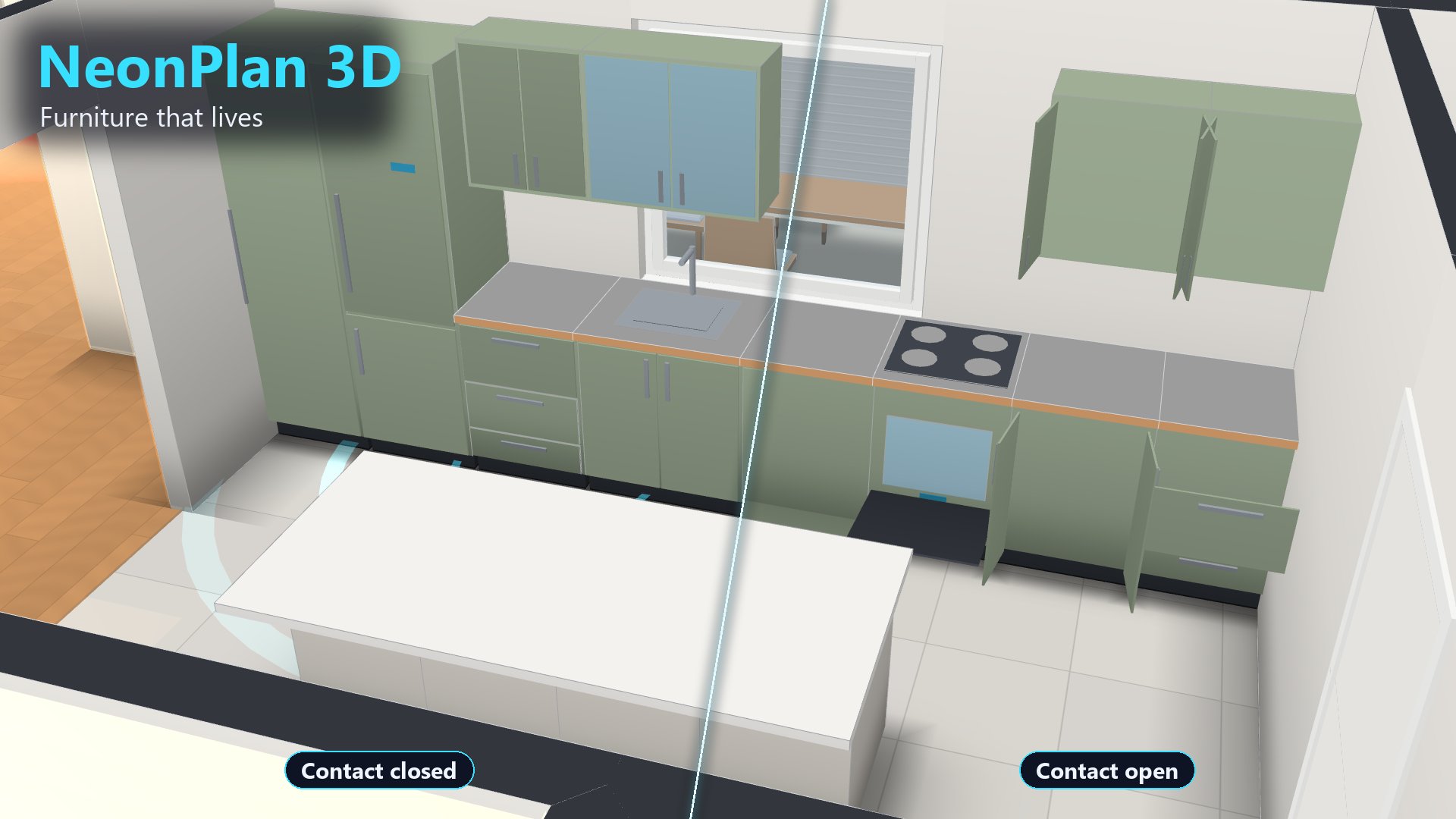
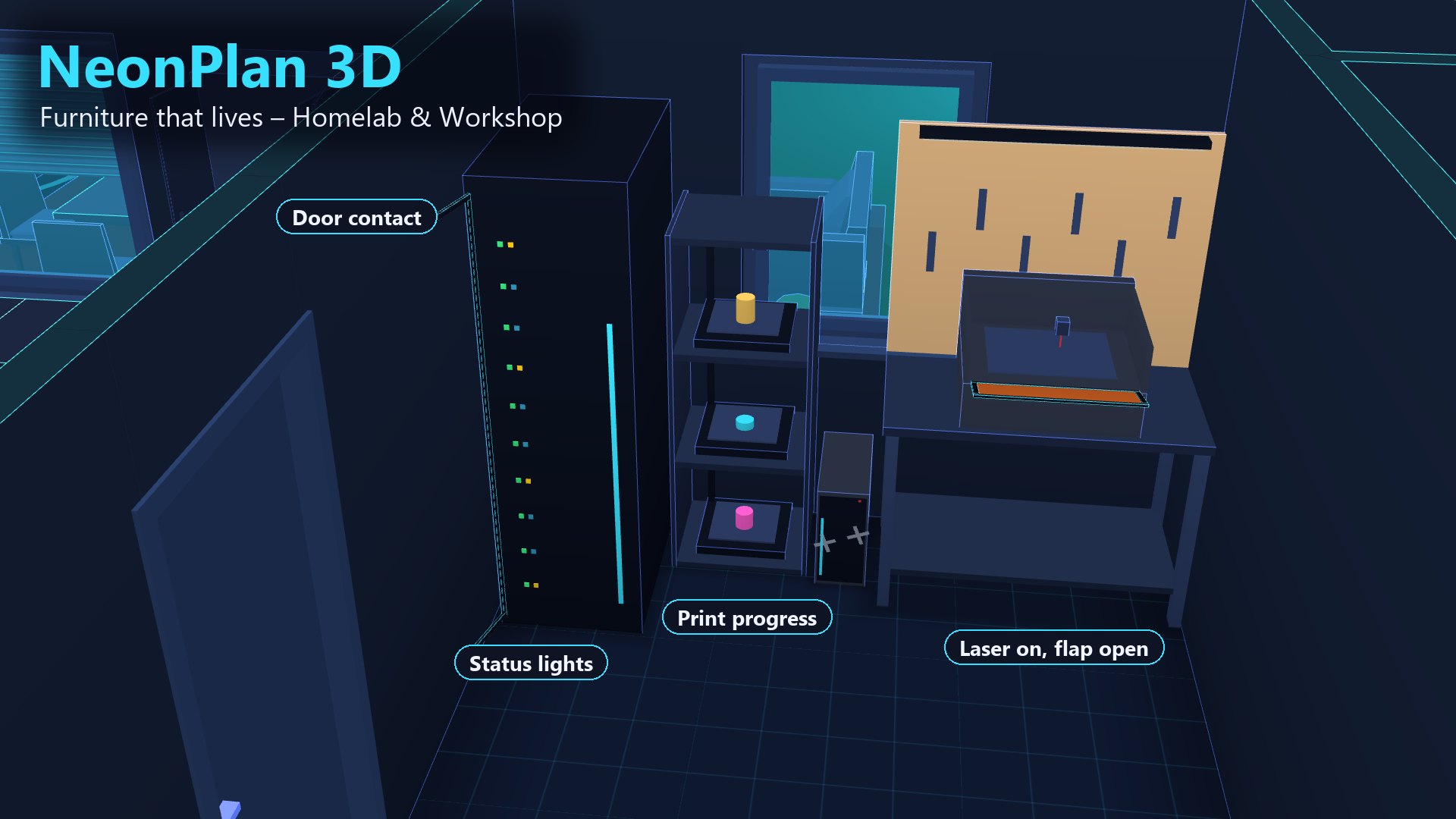
Until now your furniture just stood there. From 3.4 it moves with Home Assistant: open the fridge and its door opens in 3D, pull out a drawer and it slides out, the oven door folds down. Status lights on the server rack glow green, go dark or pulse red, the 3D printer's print grows with its progress, fans turn, tanks and batteries fill up.
How to use it
- Place an item with live parts (they carry a ✨ in the library – the chip ✨ Live shows only those).
- In the furniture form, under ⚡ Live parts, pick an entity for each part: a door contact for the door, a sensor for the print progress, and so on.
- Done. Without an entity everything stands exactly as before.
Which furniture lives
- Every cabinet, wardrobe, sideboard and kitchen unit of the room packs (Living Room, Bedroom, Kitchen, Bathroom, Dining & Hall): doors open with their contact, drawers slide out, oven and dishwasher doors fold down, fridge and freezer doors open separately. Pack owners get this as a free pack update.
- Free to try: the kitchen and bedroom taster packs (base unit, sink unit, oven, wardrobe) can do it too.
- Office & Gaming, Smart Home & Tech, Utility & Building Services: server rack, 3D printer, NAS, heat pumps (fans turn), boiler (flame), buffer tank, ventilation unit, water softener, home battery, network gear.
- New pack "Homelab & Workshop" – tech that lives: smart home server, single-board computer cluster, rack switch, UPS, server tower with fans, 10-inch mini rack with door, radio stick, printer shelf with three 3D printers, filament dryer, laser engraver, soldering station, workbench with pegboard and tool battery charging station.
🎨 Finishes – free for everyone
Wood, fabric and fronts in your own colours: oak or walnut, a grey or green sofa, sage or dark blue kitchen fronts. As swatches in the furniture form, for one item or for all the same items in the plan at once – for built-in and pack furniture alike. Finishes show in the homely styles; Neon keeps its own colours.
🔒 Every piece of furniture at a glance
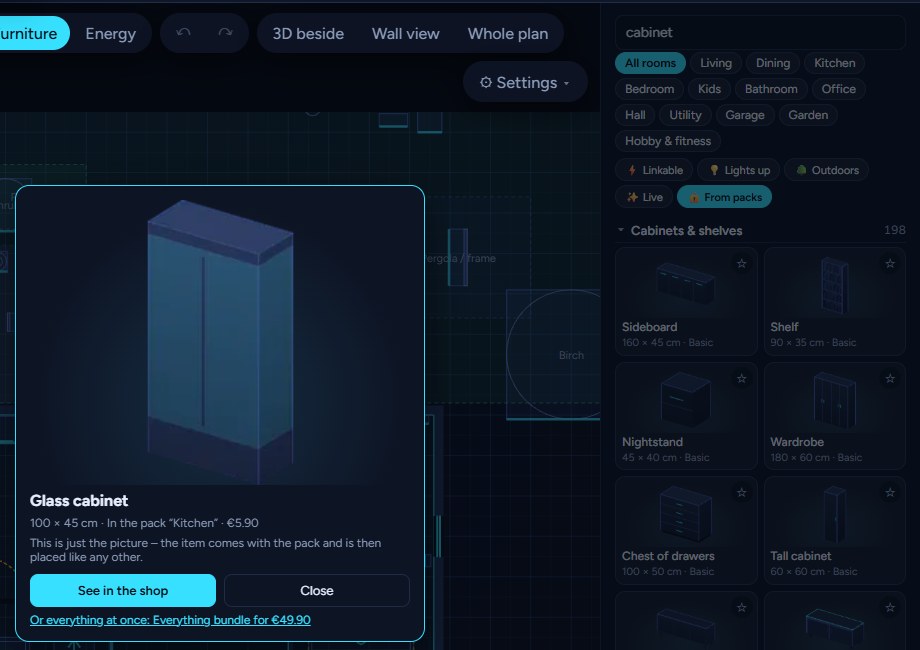
The library now also shows the furniture from packs you don't have yet – with a lock, after your own items. The search finds it too, a tap shows the picture large with its pack. It is only pictures (loaded from the shop at most once a day when the library opens); the chip 🔒 From packs hides them.
More
- Extensions page: the Pro add-ons that fit your home – cameras, a solar or grid sensor, media players, a wallbox, weather, waste collection – come first. This is checked in your browser only, nothing is sent.
- Lighter for wall tablets: the texts only the editor needs now come with the editor – every wall tablet and dashboard card loads about 160 KB less. Live parts only cost work while something moves – a door opening, a fan turning, a light pulsing for a fault; a closed kitchen costs nothing extra.
Fixed
- A neighbour's house stayed hidden after moving the map by hand (#1110, thanks RkcCorian).
- The picture frames' card on the extensions page showed raw text keys.
Found a bug? Please open an issue on GitHub.
14 November 2026 · v3.3.1
New
- A colour for a single wall: a wall drawn on its own now has 🎨 Colour in its form – for both sides, shown in the homely styles, like a room's wall colours. A half-height installation wall in the bathroom no longer takes the colour of the room wall behind it, and the walls of a carport or a shed outside the rooms no longer stay white. ↺ goes back to the room wall's colour (outside: the facade) (#1101, thanks frops83).
Fixed
- Map blocks over the carport and the shed: buildings of the map that stand for the most part on what you drew yourself are now hidden – rooms on every floor (also a floor of its own for the garden), roof sections such as a carport or a garden house, and pergolas. Before, only the ground floor's rooms counted. The plan now shows the map on every floor at the ground floor's level. Tap ⚙ Settings → 🗺 Surroundings → Align again once to update (#1099, thanks frops83).
- Cameras outside the rooms could not be tapped with "Switch devices only in the opened room": a tap opens a device's room – but a camera on the outer wall has none. A device that lies in no room now acts directly on its own floor (tap the view cone → camera picture); in All floors the tap opens its floor (#1103, thanks frops83).
- Heatmap colours disappeared after switching dashboard views and coming back, while the legend stayed (#1105, thanks moilolon).
- White ground under an own homely style based on Neon at quality High (#1106, thanks moilolon).
- Split-level houses: a roof section now sits on the floor under it, not on the highest floor beside it at another level – in the 3D view and in the editor's floor choice of a roof section (#1097, thanks abgestumpft). NeonPlan Print stacks split-level houses correctly too.
Runs on old wall tablets as before. Found a bug? Please open an issue on GitHub.
How to update
Settings → System → Updates (or HACS → NeonPlan 3D → ⋮ → Update information → Download), restart Home Assistant, then reload the page with Ctrl+F5.
14 November 2026 · v3.3.0
Your house in its neighbourhood
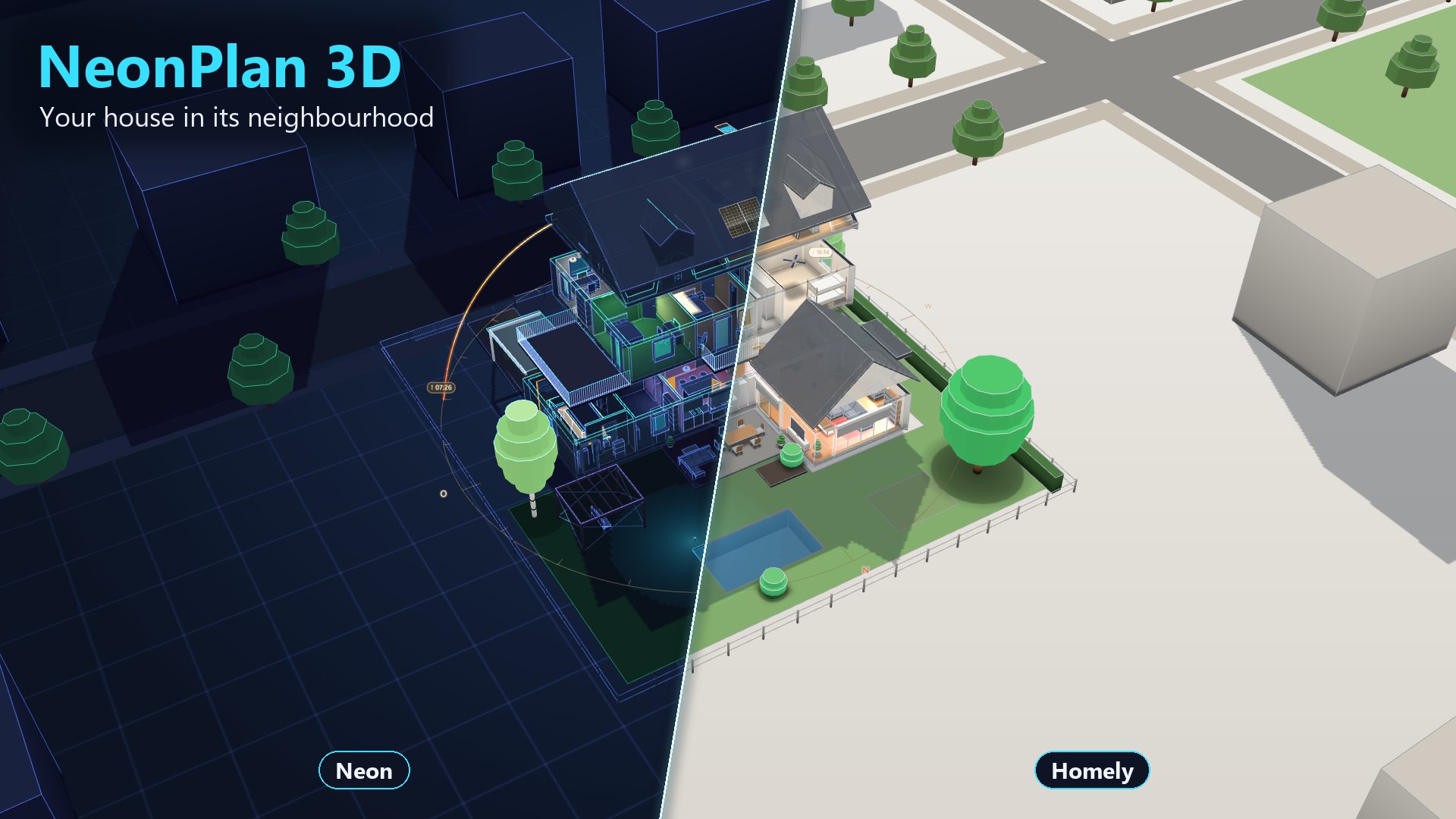
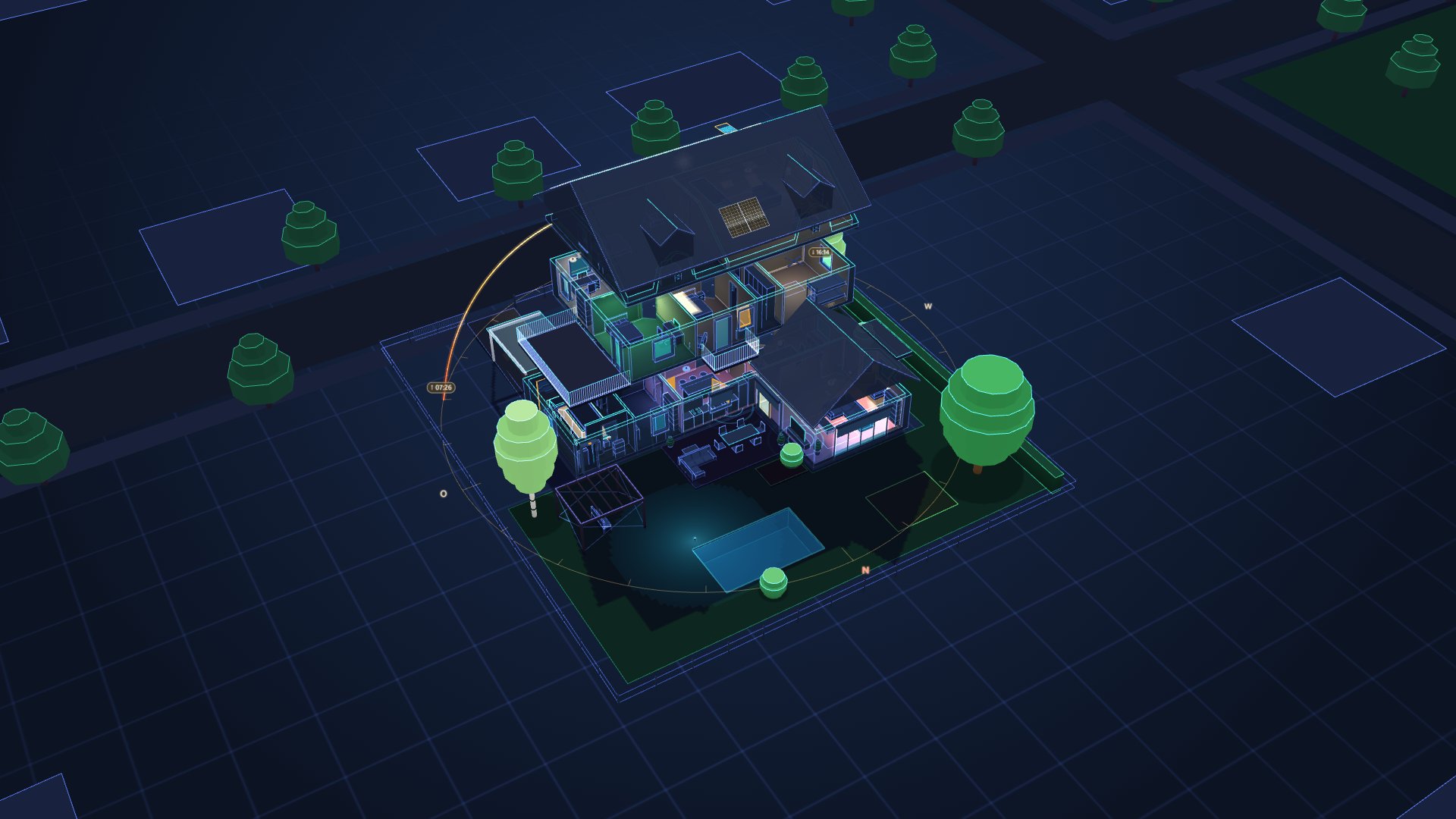
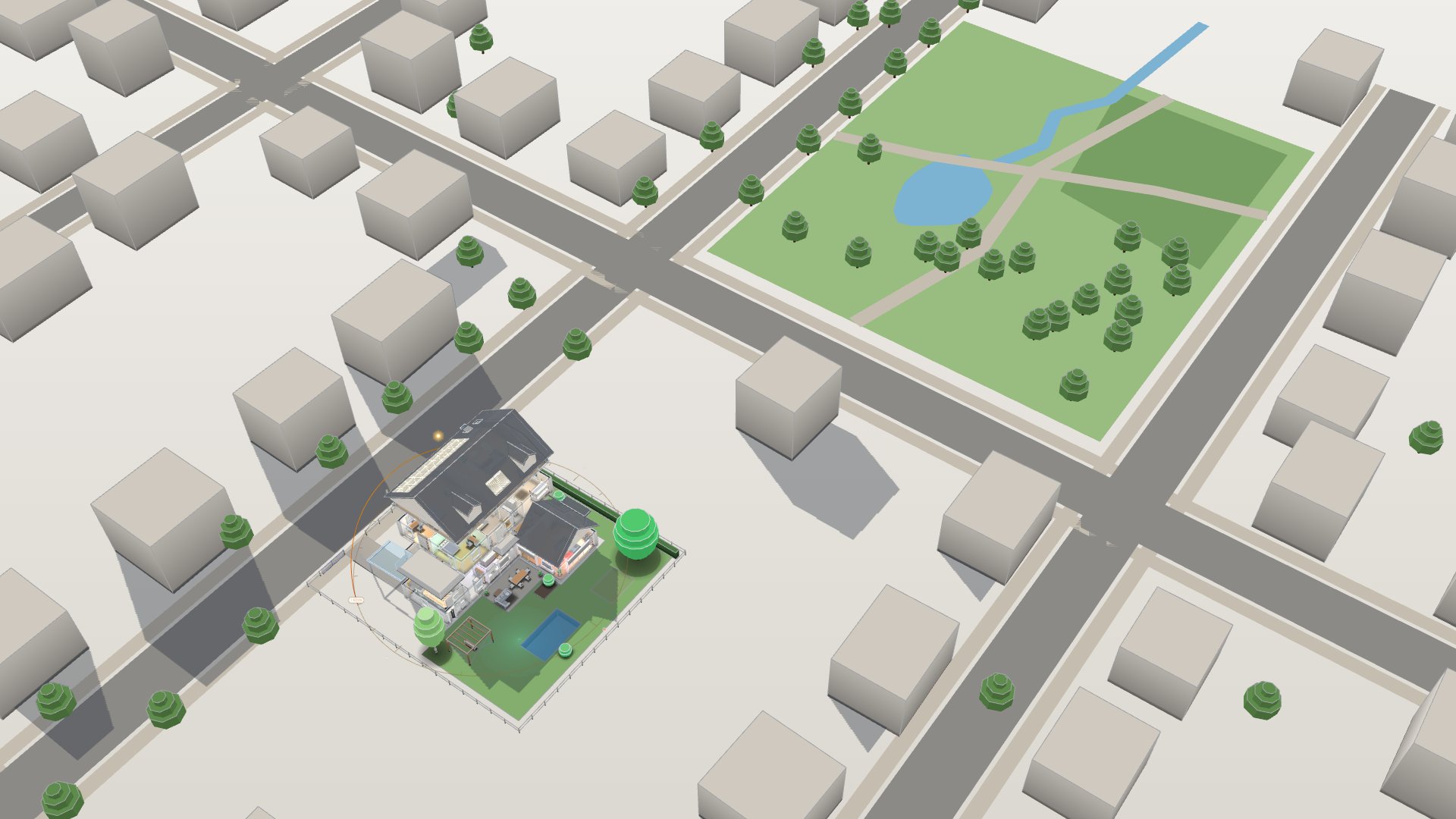
Until now your house stood alone on a grid. From 3.3 it can stand where it really is: ⚙ Settings → 🗺 Surroundings brings in your neighbourhood from the free map OpenStreetMap – the neighbours' houses as blocks at their real height, streets, footpaths, railways, streams and ponds, parks, woods and single trees. It works worldwide; how much the map knows depends on the area.
What it is good for
- You recognise your home at a glance. The street in front, the neighbours left and right, the park behind – on the wall tablet the house no longer floats in space, it is your street.
- Sun and shadows are right. NeonPlan finds your house on the map and turns north to match it. The sun's path, the sun patches in the rooms and the shadows then fall the way they really do – and the neighbours' houses cast their shadows into your garden. You see when the terrace loses the evening sun or when the house next door shades your garden.
- No more guessing north. Many plans were drawn "north up" by eye; the map sets north to the degree.
- A new house is drawn faster – see below.
How to use it
- ⚙ Settings → 🗺 Surroundings, pick the radius (100, 150 or 250 m), tap Load surroundings. When the public map servers are busy this can take up to a minute.
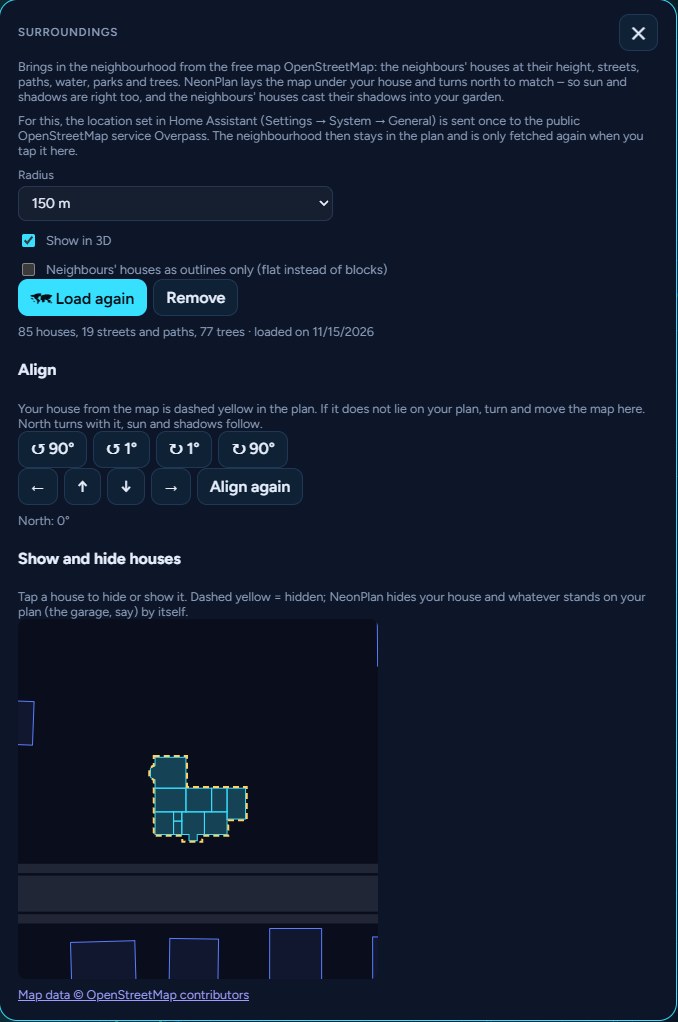
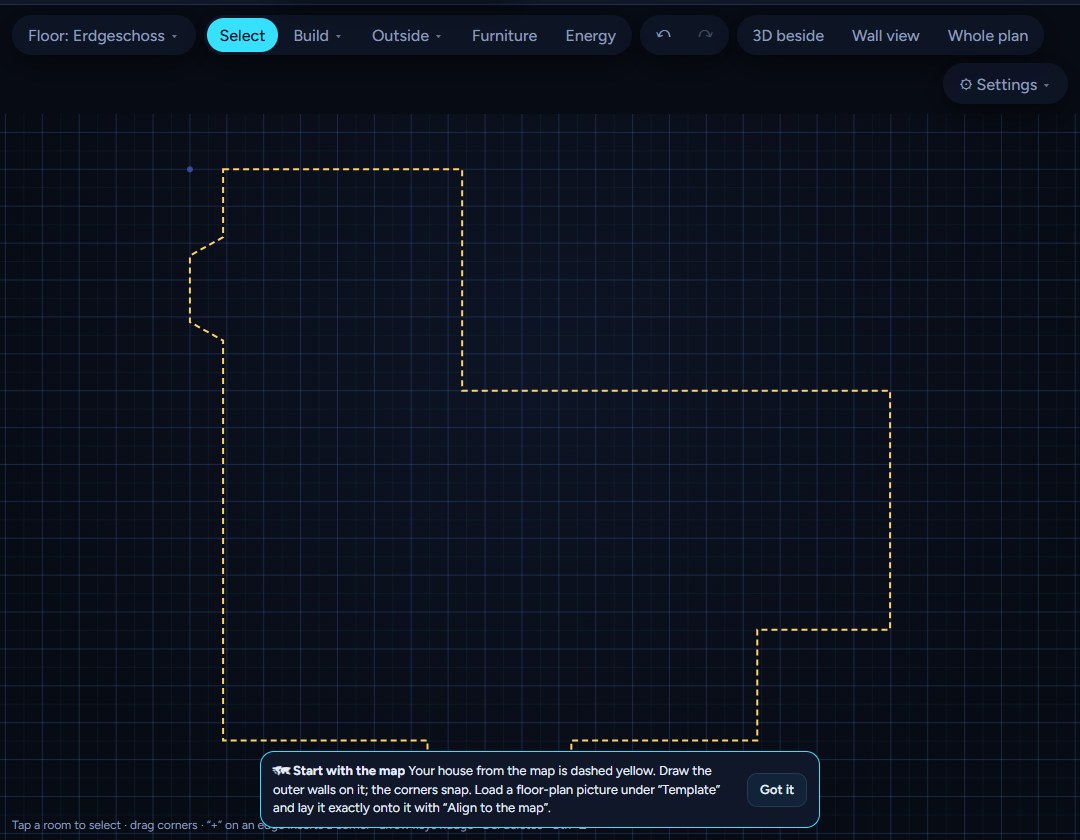
- NeonPlan lays the map under your plan by itself: your house from the map is dashed yellow in the plan. If it does not fit quite, turn the map by 90° or 1° and move it with the arrows – Align again places it automatically once more.
- Map buildings that stand on your rooms – your house, or a garage the map keeps as a building of its own – are hidden automatically.
Everything can be shown or hidden later
- Show in 3D switches the neighbourhood off and on at any time – the data stays in the plan, nothing is fetched again.
- Show and hide houses: a small map in the dialog – tap a house to hide it or show it again (dashed yellow = hidden).
- Neighbours' houses as outlines only: flat on the ground instead of blocks, if you want your own house to stand out.
- Remove deletes the neighbourhood from the plan; Load again fetches it fresh whenever you like.
- Room cards show only their rooms, without the neighbourhood. Nothing changes until you load it.
Start a new house from the map
While the ground floor is still empty, NeonPlan offers 🗺 Start with the map. Your house's outline from the map becomes the template: turned square to the grid, north already set. Draw the outer walls right on it – the corners snap – or load your floor-plan picture and tap 🗺 Align to the map (under Template): two corners in the picture, the same two on the outline, and the picture is scaled, turned and moved in one go. No more measuring with a ruler to get the scale right.
Good to know
- Privacy: to load the map, the location set in Home Assistant (Settings → System → General) is sent once to the public OpenStreetMap service Overpass – nothing else, and only when you tap the button.
- Still runs on old wall tablets: the neighbourhood is drawn once together with the house – simple blocks, nothing moves, no extra work per frame.
- A plan grows by about 20–150 KB with its neighbourhood. If you ever go back to an older version, tap Remove first – older versions cannot save a plan with surroundings.
- The pictures show the demo house in an invented neighbourhood. Map data © OpenStreetMap contributors (ODbL).
Also new
- Pack fans turn: ceiling and pedestal fans from the packs turn while they run – at their speed (#1084, thanks moeva777). Updated packs with turning fans follow in the shop.
- The gift for everyone is now winter and pets: the hint offers the free fun packs Winter & Christmas and Pets instead of Halloween.
- A new demo house in the online demo: an L-shaped home with a studio under the roof, dormers, a bay window, balconies, a roof terrace, a carport, a pool and a garden.
Fixed
- Garage doors had a roller shutter with its box in front of them, hiding the door – a garage door is now only the door, sectional or up-and-over (#1094, thanks chRyX-giT)
How to update
Settings → System → Updates (or HACS → NeonPlan 3D → ⋮ → Update information → Download), restart Home Assistant, then reload the page with Ctrl+F5.
Dein Haus in seiner Nachbarschaft
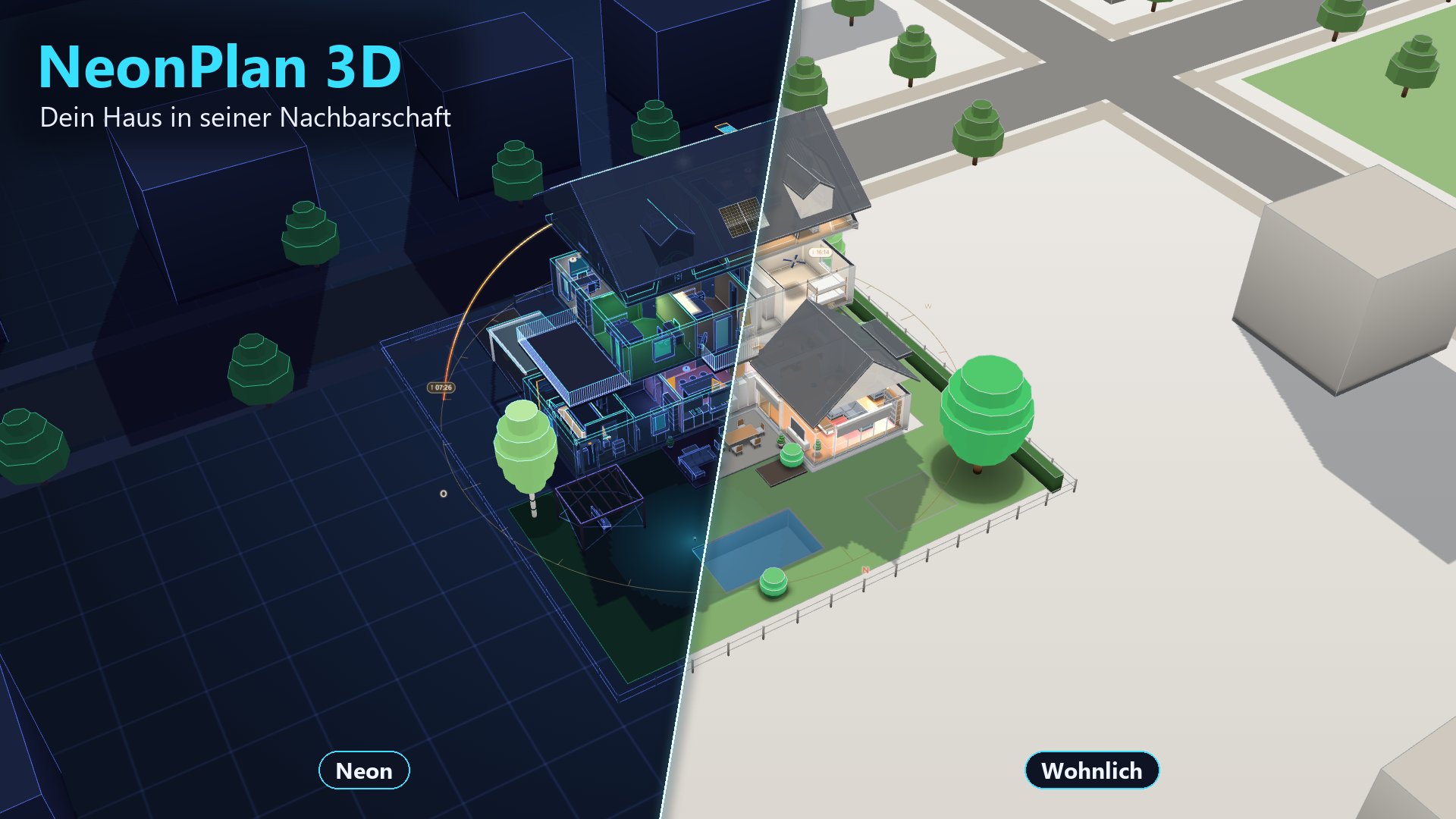
Bisher stand dein Haus allein auf einem Raster. Ab 3.3 steht es da, wo es wirklich steht: ⚙ Einstellungen → 🗺 Umgebung holt deine Nachbarschaft aus der freien Karte OpenStreetMap – die Häuser der Nachbarn als Blöcke in ihrer echten Höhe, Straßen, Fußwege, Bahngleise, Bäche und Teiche, Parks, Wälder und einzelne Bäume. Das funktioniert weltweit; wie viel die Karte kennt, hängt von der Gegend ab.
Wofür das gut ist
- Du erkennst dein Zuhause auf einen Blick. Die Straße vor der Tür, die Nachbarn links und rechts, der Park dahinter – auf dem Wandtablet schwebt das Haus nicht mehr im Nichts, es ist deine Straße.
- Sonne und Schatten stimmen. NeonPlan findet dein Haus auf der Karte und dreht den Norden passend. Sonnenbahn, Sonnenflecken in den Räumen und Schatten fallen dann so, wie sie wirklich fallen – und die Nachbarhäuser werfen ihre Schatten in deinen Garten. Du siehst, wann die Terrasse die Abendsonne verliert oder wann das Nachbarhaus den Garten verschattet.
- Kein Norden mehr nach Gefühl. Viele Pläne wurden „Norden oben“ nach Augenmaß gezeichnet; die Karte setzt den Norden aufs Grad genau.
- Ein neues Haus ist schneller gezeichnet – siehe unten.
So geht's
- ⚙ Einstellungen → 🗺 Umgebung, Umkreis wählen (100, 150 oder 250 m), Umgebung laden antippen. Sind die öffentlichen Kartenserver ausgelastet, kann das bis zu einer Minute dauern.
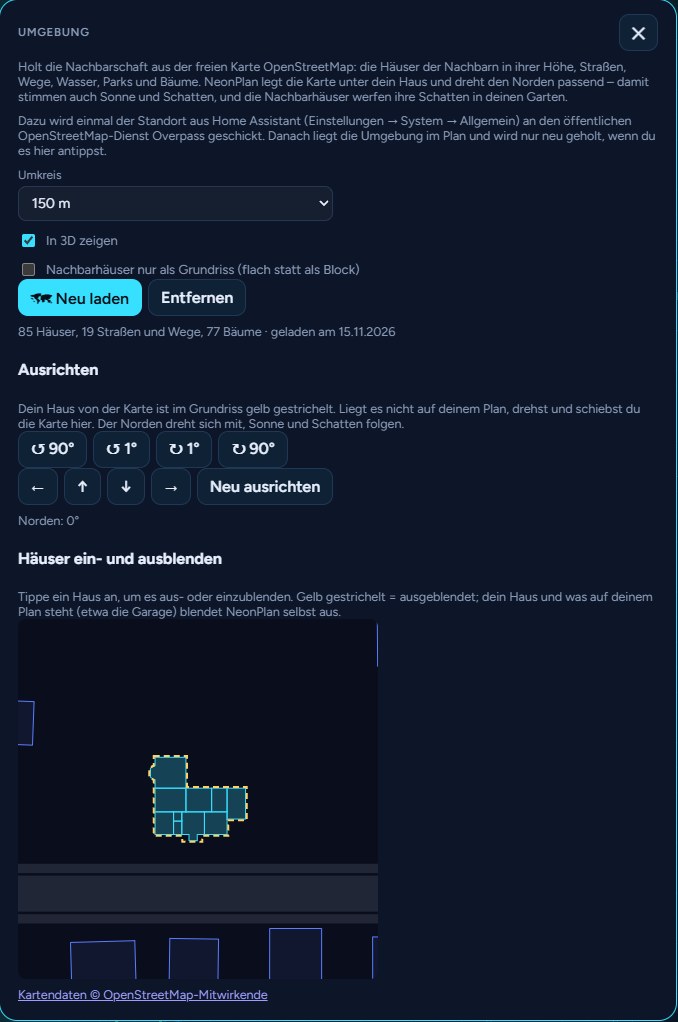
- NeonPlan legt die Karte selbst unter deinen Plan: Dein Haus von der Karte steht gelb gestrichelt im Grundriss. Passt es nicht ganz, drehst du die Karte um 90° oder 1° und schiebst sie mit den Pfeilen – Neu ausrichten legt sie wieder automatisch an.
- Gebäude der Karte, die auf deinen Räumen stehen – dein Haus oder eine Garage, die auf der Karte ein eigenes Gebäude ist – werden automatisch ausgeblendet.
Alles lässt sich später ein- und ausblenden
- In 3D zeigen schaltet die Nachbarschaft jederzeit aus und wieder ein – die Daten bleiben im Plan, nichts wird neu geholt.
- Häuser ein- und ausblenden: eine kleine Karte im Dialog – ein Haus antippen blendet es aus oder wieder ein (gelb gestrichelt = ausgeblendet).
- Nachbarhäuser nur als Grundriss: flach auf dem Boden statt als Block, wenn dein eigenes Haus hervorstechen soll.
- Entfernen löscht die Nachbarschaft aus dem Plan; Neu laden holt sie jederzeit frisch.
- Raumkarten zeigen nur ihre Räume, ohne Nachbarschaft. Solange du nichts lädst, ändert sich nichts.
Ein neues Haus mit der Karte beginnen
Solange das Erdgeschoss noch leer ist, bietet NeonPlan 🗺 Mit der Karte starten an. Der Umriss deines Hauses aus der Karte wird zur Vorlage: gerade zum Raster gedreht, der Norden schon gesetzt. Zeichne die Außenwände direkt darauf – die Ecken rasten ein – oder lade dein Grundriss-Bild und tippe 🗺 An der Karte ausrichten (unter Vorlage): zwei Ecken im Bild, dieselben zwei am Umriss, und das Bild wird in einem Rutsch skaliert, gedreht und verschoben. Kein Ausmessen mit dem Lineal mehr, damit der Maßstab stimmt.
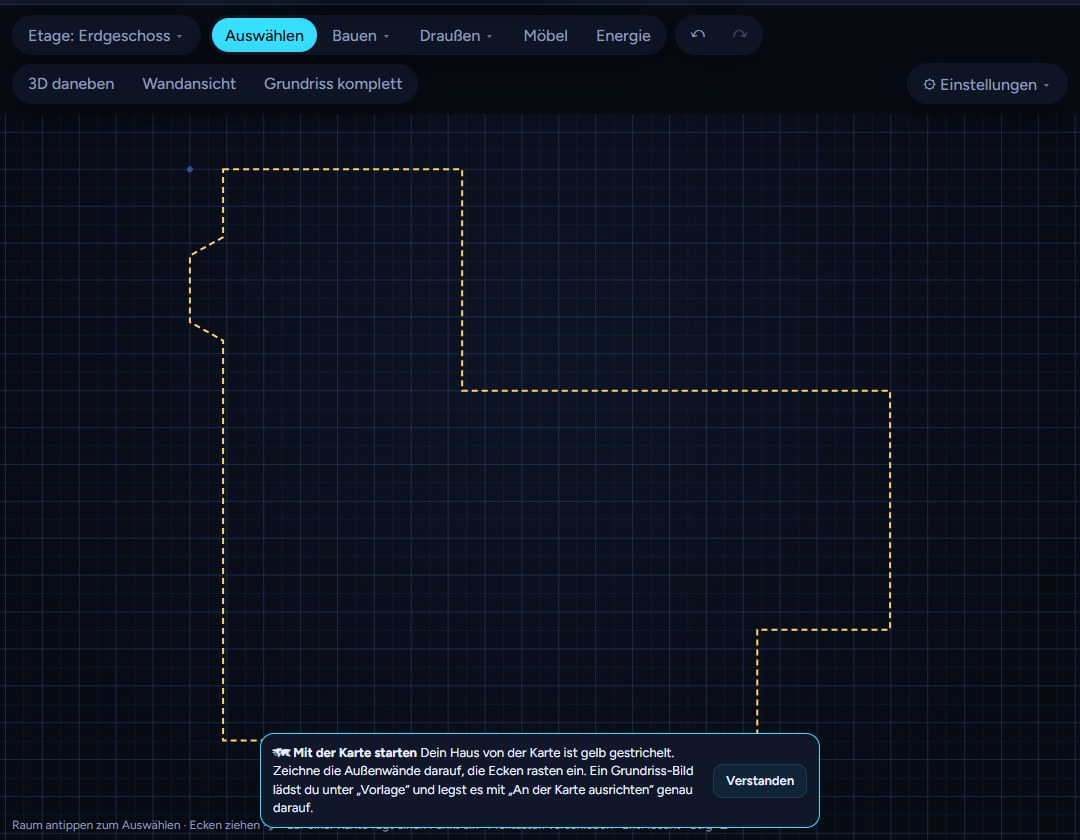
Gut zu wissen
- Datenschutz: Zum Laden wird der Standort aus Home Assistant (Einstellungen → System → Allgemein) einmal an den öffentlichen OpenStreetMap-Dienst Overpass geschickt – sonst nichts, und nur, wenn du den Knopf antippst.
- Läuft weiter auf alten Wandtablets: Die Nachbarschaft wird einmal zusammen mit dem Haus gezeichnet – einfache Blöcke, nichts bewegt sich, keine Mehrarbeit pro Bild.
- Ein Plan wird mit seiner Nachbarschaft etwa 20–150 KB größer. Gehst du einmal auf eine ältere Version zurück, vorher Entfernen tippen – ältere Versionen können einen Plan mit Umgebung nicht speichern.
- Die Bilder zeigen das Demo-Haus in einer ausgedachten Nachbarschaft. Kartendaten © OpenStreetMap-Mitwirkende (ODbL).
Außerdem neu
- Ventilatoren aus den Packs drehen sich: Decken- und Standventilatoren drehen, solange sie laufen – in ihrer Geschwindigkeit (#1084, danke moeva777). Aktualisierte Packs mit drehenden Ventilatoren folgen im Shop.
- Das Geschenk für alle ist jetzt Winter und Haustiere: Der Hinweis bietet die kostenlosen Spaß-Packs Winter & Weihnachten und Haustiere statt Halloween an.
- Ein neues Demo-Haus in der Online-Demo: ein Haus in L-Form mit Atelier unterm Dach, Gauben, Erker, Balkonen, Dachterrasse, Carport, Pool und Garten.
Behoben
- Vor Garagentoren hing ein Rollladen mit Kasten, der das Tor verdeckte – ein Garagentor ist jetzt nur noch das Tor, Sektional- oder Schwingtor (#1094, danke chRyX-giT)
So aktualisierst du
Einstellungen → System → Updates (sonst HACS → NeonPlan 3D → ⋮ → Update-Informationen → Herunterladen), Home Assistant neu starten, dann die Seite mit Strg+F5 neu laden.
13 November 2026 · v3.2.0
The house turns homely as you zoom in
Pick a second style under When zooming in (right below the style choice): from afar your house stays neon, close up in a room it flows into, say, Homely – smoothly, without reloading. early … late sets when it begins, Only the room turns just the room you zoom into or tap and keeps the rest of the house in its look. In the dashboard card it is in the card dialog too (or YAML: zoom_style: cozy, zoom_late: 50, zoom_scope: room). Nothing changes until you choose a zoom style.
New
- Today's calendar entries in "Today in the household" (Household Pro) – tick calendars under ⚙ Settings → House. All-day entries first, then by time; one starting within the hour glows amber. Thanks T-Eberle for the idea.
- Room names where you want them – the selected room's name has a handle ✥ in the plan: drag it where it covers no other name, in the plan and in 3D (double tap: back to the middle). ⚙ Settings → House sets their size in 3D, and Names next to Effects hides them in the editor's 3D pane. Thanks Banhammer1919 for the idea.
- Up-and-over garage door – a garage door's Kind of door: sectional as before, or one leaf that swings out and up. Thanks ProvUK for the idea.
- Neon sign – your own text in glowing tubes on the wall (Decoration). It glows with its light or switch, in the light's colour, or always. Thanks ProvUK for the idea.
- Every language now has the texts of several plans and room cards (they were in English until now).
Fixed
- Window panes turned opaque in the homely styles after opening a floor and going back to all floors (#1081, thanks abgestumpft)
- Roof windows on a flat roof stood tilted like solar modules – they lie flush now (#1078, thanks michaelbell1981)
- Own styles were missing in the card dialog on a dashboard (#1077, thanks RobertSorgenfrei)
- Hologram cards over the roof were cut off at the top – they now stay inside the view (#1088, thanks abgestumpft)
Still runs on old wall tablets – the zoom style only changes colours, no extra work for the GPU.
How to update
Settings → System → Updates (or HACS → NeonPlan 3D → ⋮ → Update information → Download), restart Home Assistant, then reload the page with Ctrl+F5.
Das Haus wird beim Hineinzoomen wohnlich
Unter Beim Hineinzoomen (direkt unter der Stil-Auswahl) wählst du einen zweiten Stil: Von weitem bleibt dein Haus Neon, nah im Raum geht es fließend zum Beispiel in Wohnlich über – ohne Neuladen. früh … spät legt fest, wann es einsetzt, Nur der Raum macht nur den Raum wohnlich, in den du zoomst oder den du antippst; der Rest des Hauses bleibt im eingestellten Look. In der Dashboard-Karte steht es auch im Karten-Dialog (oder YAML: zoom_style: cozy, zoom_late: 50, zoom_scope: room). Solange du keinen Zoom-Stil wählst, bleibt alles wie bisher.
Neu
- Heutige Termine in „Heute im Haushalt“ (Haushalt Pro) – Kalender unter ⚙ Einstellungen → Haus anhaken. Ganztägige zuerst, dann nach Uhrzeit; was in der nächsten Stunde beginnt, leuchtet gelb. Danke an T-Eberle für die Idee.
- Raumnamen, wo du sie willst – der Name des ausgewählten Raums hat im Plan einen Griff ✥: dorthin ziehen, wo er keinen anderen verdeckt, im Plan und in 3D (doppelt tippen: zurück in die Mitte). Unter ⚙ Einstellungen → Haus stellst du ihre Größe in 3D ein, und Namen neben Effekte blendet sie in der 3D-Hälfte des Editors aus. Danke an Banhammer1919 für die Idee.
- Schwingtor – beim Garagentor die Torart: Sektionaltor wie bisher oder eine Platte, die nach außen und oben schwenkt. Danke an ProvUK für die Idee.
- Neon-Schild – dein eigener Text in leuchtenden Röhren an der Wand (Deko). Es leuchtet mit seinem Licht oder Schalter, in der Farbe des Lichts, oder immer. Danke an ProvUK für die Idee.
- Alle Sprachen haben jetzt auch die Texte für mehrere Pläne und Raumkarten (bisher Englisch).
Behoben
- Fensterscheiben wurden in den wohnlichen Stilen nach einem Etagenwechsel deckend (#1081, danke abgestumpft)
- Dachfenster auf einem Flachdach standen schräg wie Solarmodule – sie liegen jetzt flach im Dach (#1078, danke michaelbell1981)
- Eigene Stile fehlten im Karten-Dialog auf einem Dashboard (#1077, danke RobertSorgenfrei)
- Energie-Karten über dem Dach wurden oben abgeschnitten – sie bleiben jetzt im Bild (#1088, danke abgestumpft)
Läuft weiter auf alten Wandtablets – der Zoom-Stil färbt nur um, ohne Mehrarbeit für die Grafik.
So aktualisierst du
Einstellungen → System → Updates (oder HACS → NeonPlan 3D → ⋮ → Update-Informationen → Herunterladen), Home Assistant neu starten, dann die Seite mit Strg+F5 neu laden.
12 November 2026 · v3.1.2
NeonPlan 3D 3.1.2
Fixes from your reports: the homely styles look right with windows, displays and lamps, L-stairs and crossing roofs are cut where they should be. Still runs on old wall tablets.
Fixed
- Homely styles – window panes: the glass no longer shows as pure white from outside and inside. It is a light tint now, you see through it, and it darkens with the house in the evening.
- Homely styles – running devices: the display of a heating radiator, a TV or a coffee machine shows its colour instead of glaring white, and dims in the evening (less than the house, so you still see what runs).
- Homely styles – lamps: a lit lamp is no longer darker than the wall it lights; it shines and keeps its brightness in the evening.
- L-shaped stairs from the stairs pack no longer cut a hole into the floor above where no stair is – only where the steps and landings stand.
- Two equal roofs crossing at a hipped end meet in a clean valley instead of standing inside each other.
Thanks for the reports: abgestumpft, bwynants, luisrocejo.
How to update
- Settings → System → Updates shows NeonPlan 3D 3.1.2. If it is missing: HACS → NeonPlan 3D → ⋮ → Update information, then Download.
- Restart Home Assistant.
- Reload the browser with Ctrl+F5; in the companion app close the app fully.
12 November 2026 · v3.1.1
NeonPlan 3D 3.1.1
A big round of fixes from your reports, two wishes from the community, and Turkish as the twentieth language. Still runs on old wall tablets.
New
- Venetian blinds show their slats: a Raffstore or venetian blind whose cover reports a slat tilt is drawn as single slats that turn with it – level when open, like the roller shutter when shut. The sunlight in the room follows them. Invert slats (0 = open) in the window's form helps integrations that report it the other way round (idea and groundwork: danymue).
- Blinds inside the room: Blind sits: inside (roller shade) hangs a window's blind in the room instead of outside (idea: TRusselo).
- Outdoor areas: the + on an edge puts a new corner there, and a selected area shows its corner numbers and edge lengths.
- "more" on glass cards: on a narrow dashboard card, a glass card such as the heat pump's shows its minor values with one tap.
- Turkish as a language (texts: ethemcemozkan), and Slovak reworked by a native speaker (Bearstorm).
Fixed
- Two devices, one plan: a phone whose app slept in the background overnight could save its old plan over what was drawn on the PC meanwhile. Now the newer plan wins, and your change waits with take over or discard.
- Located people without a figure: a person in a zone of their own at the house (a "Garden" zone) is at home and gets their figure; a device of someone who is away stands as a point instead of vanishing.
- Homely styles: lamp light no longer washes coloured walls out to white – a blue wall stays blue.
- Looking through a camera takes the camera's field of view (the view was a narrow slice from about eye level), and the picture comes after the flight. A fixed camera can be chosen in the editor again.
- "Switch devices only in the opened room" now really means that room: a blind of the house no longer moves while the garden is open.
- Pets stay indoors and use the doors between rooms instead of walking through walls, hedges and the closed garage door.
- The walk gets through upstairs doors where the rooms are drawn apart.
- A top-floor wall no longer ends under a lower garage roof when it lies a few millimetres outside its own roof.
- The 3D view no longer jumps when the pointer crosses the floor and room row on a desktop.
- The online demo no longer shows parts of an add-on that is not out yet.
Thanks to everyone who reported, tested and sent pull requests: daene85, TRusselo, danymue, wilds, Bearstorm, ethemcemozkan, abgestumpft, vincegre, gshafer, cesp99-ux, RobertSorgenfrei, luisrocejo, Deninho91.
How to update
- Settings → System → Updates shows NeonPlan 3D 3.1.1. If it is missing: HACS → NeonPlan 3D → ⋮ → Update information, then Download.
- Restart Home Assistant (this update changes the integration too).
- Reload the browser with Ctrl+F5; in the companion app close the app fully.
11 November 2026 · v3.1.0
NeonPlan 3D 3.1 – Neon was just the beginning
Your home in every style.
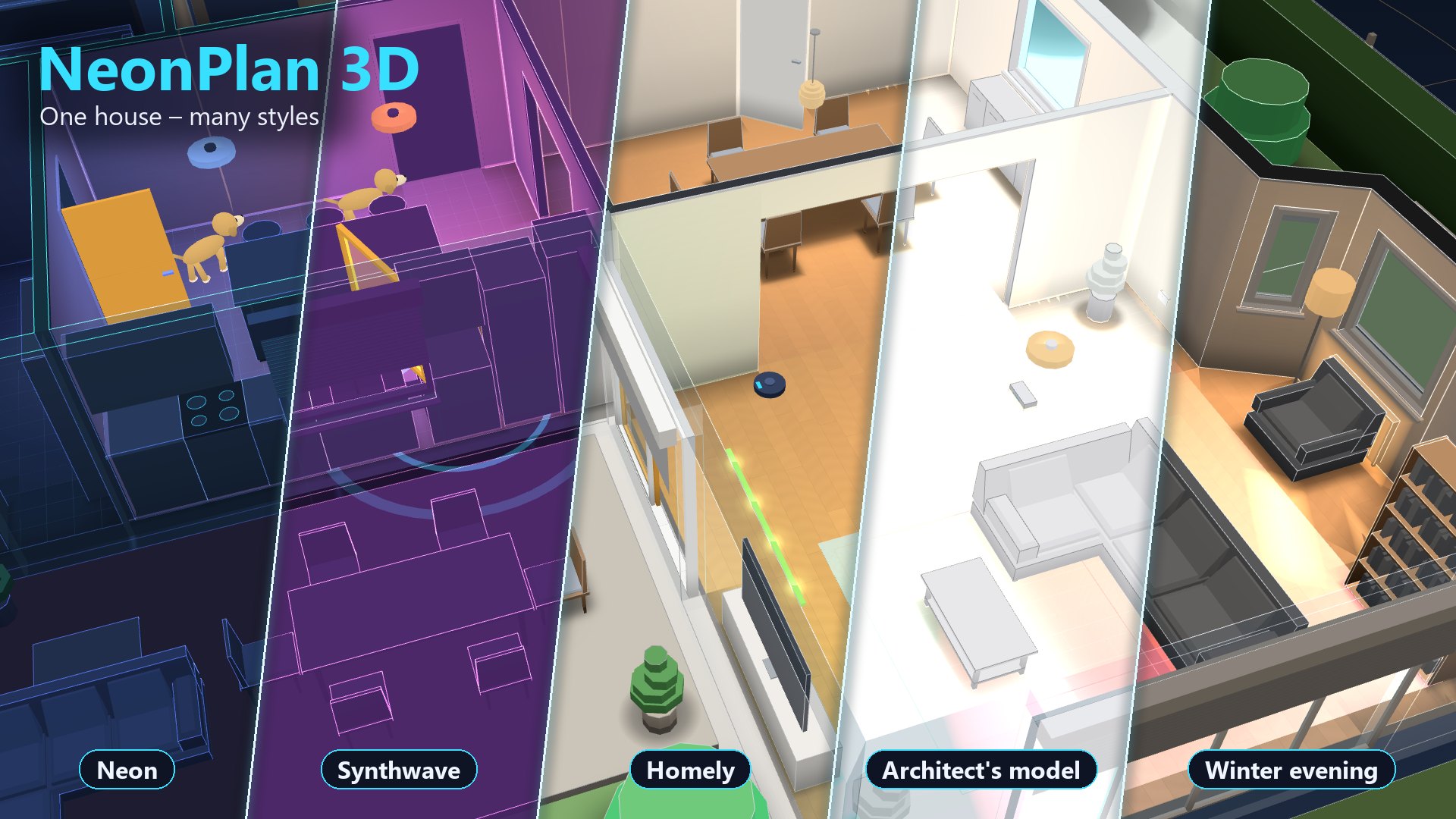
You asked for it – here it is. Your house no longer has to be neon. Homely with wooden floors and your own wall colours, Synthwave, Architect's model, Winter evening – or a style you build yourself. The editor and the controls stay neon; the house wears whatever you like.
Free for everyone. And it still runs on old wall tablets – the styles only colour differently, they cost no extra performance.
11 November 2026 · v3.0.6
Changed: the Digital Picture Frames pack brings its own module
The living faces of the "Digital Picture Frames" pack – calendar, lists, family board, people, camera, cover, person, photos, weather – and their pop-ups now come with the pack (release 2) as a signed module, like Heat Pro. NeonPlan itself only provides the stage.
- Owners of the pack: release 2 arrives with the daily pack update (or tap Check now under Extensions → Shop connection, then Update at the pack). Then approve the module once under Extensions – the usual review for modules. Until then the frames show a dark pane.
- Everything you set up with 3.0.5 is kept and read as it is.
- If a pack of an older release has no module yet, the Extensions page says so.
New
- Effects in the editor's 3D pane can rest: a chip Effects beside Auto / Cut switches weather, sun, pets and ghost off in the pane beside the plan – a quiet pane for drawing. The 3D view itself is not affected (#1033, thanks daene85).
Fixed
- A new plan showed roofs of the main plan: on the property, a plan whose rooms were all deleted still brought its leftover roof sections along (a pent roof in the air looked like a glass table). A building without rooms has no roof on the property any more (#986, thanks Ollywood71).
- Snow on a sloping lawn followed the high edge and floated over the low side; it now lies on the slope (#1036, thanks Anrolosia).
- Snow on the roof covered the solar modules' figures; the living solar overlay now lies on top of the snow (#1031, thanks PetrMa).
- A track with several spots lit only from its middle with one narrow cone. A pack lamp with several glowing parts now lights from each of them, with a cone under each spot (#1034, thanks daene85).
- Time travel, day summary: a room's temperature range used every temperature sensor of its area, dew point and comfort indices included. It now takes the room's own temperature (⚙ Room climate) or the plain temperature sensors, and switches that drive a lamp of the plan count as lights (#1032, thanks abgestumpft).
- Free-form outdoor areas had no corners to type in: the form now lists every corner with X and Y like a room's, so edges can be made straight and parallel; × removes a corner (#1041, thanks daene85).
- A lamp without a light showed an "Off" pin in the marker modes All and In the room, which could not be tapped. Such a lamp gets no pin any more (#982, thanks daene85).
- Import page: a RoomPlan scan of a whole home whose walls are listed only per room was not recognised; it is now read like any other scan.
For module makers
A module may lay a picture on the screen face of a piece of furniture (screen piece), open a pop-up of plain sections over the view (popups, host.openPopup) and ask the editor for uploaded pictures (images field). The host tells a module where people stand, which look is on and whether the tablet level runs.
As always: NeonPlan runs on old and weak wall tablets too. Bugs and feedback please as a GitHub issue.
Geändert: Das Pack „Digitale Bilderrahmen“ bringt sein eigenes Modul mit
Die lebenden Flächen des Packs „Digitale Bilderrahmen“ – Kalender, Listen, Familien-Board, Personen, Kamera, Cover, Person, Fotos, Wetter – und ihre Pop-ups kommen jetzt mit dem Pack (Release 2) als signiertes Modul, wie Wärme Pro. NeonPlan selbst stellt nur die Bühne.
- Wer das Pack hat: Release 2 kommt mit dem täglichen Pack-Update (oder unter Erweiterungen → Shop-Verbindung Jetzt prüfen tippen, dann beim Pack Aktualisieren). Danach das Modul einmal unter Erweiterungen freigeben – die übliche Prüfung für Module. Bis dahin zeigen die Rahmen eine dunkle Fläche.
- Alles, was du mit 3.0.5 eingerichtet hast, bleibt erhalten und wird so übernommen.
- Hat ein Pack aus einem älteren Release noch kein Modul, sagt die Erweiterungen-Seite es dazu.
Neu
- Effekte im 3D-Fenster des Editors abschaltbar: Ein Schalter Effekte neben Automatisch / Schnitt schaltet Wetter, Sonne, Haustiere und Geist im Fenster neben dem Plan ab – ein ruhiges Fenster zum Zeichnen. Die eigentliche 3D-Ansicht bleibt unberührt (#1033, danke daene85).
Behoben
- Ein neuer Plan zeigte Dächer des Hauptplans: Auf dem Grundstück brachte ein Plan, dessen Räume alle gelöscht waren, seine übrig gebliebenen Dachflächen mit (ein Pultdach in der Luft sah aus wie ein Glastisch). Ein Gebäude ohne Räume hat auf dem Grundstück jetzt kein Dach mehr (#986, danke Ollywood71).
- Schnee auf einem Rasen am Hang folgte der hohen Kante und schwebte über der tiefen Seite; jetzt liegt er auf dem Hang (#1036, danke Anrolosia).
- Schnee auf dem Dach verdeckte die Zahlen der Solarmodule; die lebende Solar-Anzeige liegt jetzt über dem Schnee (#1031, danke PetrMa).
- Ein Schienenstrahler mit mehreren Spots leuchtete nur aus der Mitte mit einem schmalen Kegel. Eine Pack-Lampe mit mehreren Leuchtteilen leuchtet jetzt aus jedem davon, mit einem Kegel unter jedem Spot (#1034, danke daene85).
- Zeitreise, Tageszusammenfassung: Der Temperaturbereich eines Raums nahm jeden Temperatursensor seines Bereichs, auch Taupunkt und Komfort-Kennzahlen. Jetzt nimmt er die eigene Temperatur des Raums (⚙ Raumklima) oder die normalen Temperatursensoren, und Schalter, die eine Lampe des Plans schalten, zählen als Licht (#1032, danke abgestumpft).
- Freie Außenflächen hatten keine Eckpunkte zum Eintippen: Das Formular listet jetzt jede Ecke mit X und Y wie bei einem Raum, so lassen sich Kanten gerade und parallel ziehen; × entfernt eine Ecke (#1041, danke daene85).
- Eine Lampe ohne Licht zeigte einen „Aus“-Pin in den Pin-Modi Alle und Im Raum, der sich nicht antippen ließ. Solche Lampen bekommen keinen Pin mehr (#982, danke daene85).
- Import-Seite: Ein RoomPlan-Scan einer ganzen Wohnung, dessen Wände nur je Raum aufgeführt sind, wurde nicht erkannt; jetzt wird er wie jeder andere Scan gelesen.
Für Modul-Entwickler
Ein Modul kann ein Bild auf die Bildschirmfläche eines Möbels legen (screen), ein Pop-up aus einfachen Abschnitten über der Ansicht öffnen (popups, host.openPopup) und im Editor hochgeladene Bilder abfragen (Feld images). Der Host sagt einem Modul, wo Personen stehen, welcher Look aktiv ist und ob die Tablet-Stufe läuft.
Wie immer: NeonPlan läuft auch auf alten und schwachen Wandtablets. Fehler und Rückmeldungen bitte als GitHub-Issue.
10 November 2026 · v3.0.5
New: the "Digital Picture Frames" pack (shop)
Picture frames whose face lives. Choose in the furniture form what a frame shows, and tap it in 3D to open the content large in the middle of the view:
- Calendar – the next days, today first, one colour per calendar; what runs now reads "now", what starts shortly "in 20 min", birthdays get a 🎂. The pop-up holds a week, unfolds descriptions, and adds new events to calendars that allow writing. An optional reminder shows a note before an event (and speaks it with the announcements module).
- Shopping / to-do list from Home Assistant – tick items off and add new ones in the pop-up.
- Family board – today and tomorrow, who is home, tomorrow's bins (Household Pro), the weather. The kitchen screen in one frame.
- People – who is home, in which room (Live Presence), for how long.
- Camera with the doorbell frame: pops up large for 30 seconds when the doorbell rings, motion is seen or the camera detects something; live with Camera Cockpit.
- Music / TV (cover, with controls), person (picture from Home Assistant), photo slideshow (upload several photos or give URLs), weather with a three-day forecast and a rain warning.
11 frames: portrait and landscape in three sizes, square, poster, slim digital frames for wall and sideboard, a standing wooden frame. The Deco pack's digital frame joins in once the pack is installed. Needs 3.0.5.
Fixed
- Window light at night as the lamp's cone: the patch in front of a window is now the lamp's light through the opening – shifted away from the lamp, fainter with the distance, and nothing from a lamp around the corner that a wall hides from the window (#954, thanks rolandarends).
- Turned gable on a bigger roof: a small roof section turned at an angle on a larger one (a 45° gable over a pointed bay in a hip roof) was treated as a dormer and cut boxes out of the slope while vanishing itself; it now meets the roof below like a wing (Discord, thanks Thomas).
- Spot grid: "None" for the light stayed automatic (#982, thanks daene85).
- No state sync while the view turns: new states wait until the finger (or the inertia) has come to rest, so a sync no longer costs frames in the middle of a swipe on a slow wall tablet (#952, thanks zanzei26).
10 November 2026 · v3.0.4
A round of fixes from your reports, plus two small additions people asked for.
Added
- Ground mist in fog: with the fog effect switched on (Settings → Weather effects in 3D), soft swathes of mist now drift low over the ground around the house; the grey behind the house alone was hard to see (#990, thanks PetrMa).
- Outdoor steps below the floor level: outside the rooms the height above the floor may go below 0, down to −5 m – steps down to a sunken terrace or a light well (#897, thanks fammastrodaiuto).
- Module forms: a plain number field for add-ons (Wärme Pro Release 13 uses it for a fixed flow rate).
Fixed
- Own symbol on lamps and in the room list: a lamp's own symbol shows in its pin, and the room panel's device list shows the own symbols of furniture and placed devices (#1005, thanks EduK85).
- Fixed colour and moods: a light whose integration reports a mood or scene as its "effect" (Loxone) no longer turns through the colour wheel; a lamp with a fixed colour never animates, and a white-only light never runs a colour effect (#977, thanks chRyX-giT).
- Sun arc and compass with the floors pulled apart: the ring rides with the ground floor instead of staying down at the cellar (#998, thanks RkcCorian).
- Roof in a card with some rooms of the top floor: a flat or gable roof kept the footprint of the shown rooms only, so its slopes and roof windows no longer matched; the card keeps the whole house's roof (#997, thanks RkcCorian).
- U-stair opening one tread too long: with an even number of risers the second flight is a tread shorter than the first, but the floor above was cut over the whole footprint; the opening now ends at the top tread (#742, thanks daene85).
- Dashboard button covered the full screen button on a card with both (D1002, thanks karli4711).
Manual: English · Deutsch
8 November 2026 · v3.0.3
Another small round from your reports.
Added
- Fixed colour in 3D for a lamp. It always glows in the chosen colour, whatever colour its light reports; on/off and brightness still follow the light. The older option now says what it does: "Glow only while the light shows this colour" (#977, thanks chRyX-giT).
Fixed
- Keep view also holds the camera between the house view and a floor, not only from floor to floor (#968, thanks RkcCorian).
- Time travel on outdoor areas. A balcony or terrace with an area of its own kept its live values while scrubbing; its sensors replay now (#974, thanks AlBertyBundy).
- Household Pro for pack appliances. The kitchen pack's built-in dishwasher and oven (and any pack washer, dryer, dishwasher or oven) get the time-left and door-sensor fields, the "Done!" pin and the glow while they run (#973, thanks grzegorz914).
- Roof windows in a room card. A card without the top floor drew the roof's windows in the air over the floor shown; such a card shows no roof at all now, like the floor view (#967, thanks RkcCorian).
- Fewer passes on wall tablets, part two. The floor shadows, the light on floors and walls and two fun-pack surfaces are drawn in one pass as well (#952, thanks zanzei26 for measuring).
After the update, reload the browser once (Ctrl+F5).
6 November 2026 · v3.0.2
A small round of fixes from your reports.
Fixed
- Light out of the windows follows the lamp's real brightness. A lamp dimmed to 1 % still threw its full colour out of floor-deep windows onto the terrace. Its room keeps a faint glow so a dimmed lamp stays visible; the window light no longer does (#954, thanks rolandarends).
- Motion, door and presence sensors show no watts. A binary sensor's pin took the power meter of its device and said "3 W" at a motion sensor, also in the room view (#337, thanks frops83).
- Fewer passes on wall tablets. See-through surfaces drawn from both sides (glass, light cones, water, screens) are drawn in one pass instead of two: about a tenth of the frame time on a slow mirror, no visible change (#952, thanks zanzei26 for the profile).
- Waste bins with dates written as 17-11-2026. A sensor whose state holds a day-first date with dashes (Afvalbeheer and others) showed "2026 days" until pickup. Such dates are read now, and the integration's own
Days_until attribute is used when it is there (#962, thanks vermeerschn).
After the update, reload the browser once (Ctrl+F5).
5 November 2026 · v3.0.1
New
- Lift-and-slide doors and sliding windows: two new presets (window style Sliding). One pane stands, the other runs on the inner track in front of it – as far as its contact says open. One of the most wanted ideas, asked for in five threads (#397, thanks @Ubituxxx, @Cle2301 and everyone who voted; sliding windows #361, @Markjgabb).
- Top-hung windows: hung at the top, the bottom opens outwards – common in Scandinavia (#327, @GrumpyBusted).
- Duplicate floor: floor settings → Duplicate floor puts the floor once more on top of the house with its rooms, walls, windows, doors and furniture – without the links to Home Assistant, because the devices up there are other ones (#443, @AnkhMorpork78).
- Pins only while active: "Marker in 3D" → Only while active shows a motion sensor's or a door contact's pin only while it is on, open or triggered (#337, @vermeerschn).
- Kamera-Cockpit: picture on a new detection: switched on in a camera's form, every new detection pops up the camera's picture for 20 seconds – a tap looks through the camera (#442, @rolandarends).
- Durchsagen and "Das Haus antwortet" are out of the beta – thank you to every supporter who tested them.
- Walk from a room: the room panel has a 🚶 button that starts the walk right in that room (#950, @PetrMa).
Fixed
- Several radiators on one thermostat: each now shows its own pin with the temperature and keeps its own icon; before, only the last one showed, and an icon seemed to jump back (#932, thanks @skywalker0403 and EduK85).
- Values without room names: with the room names switched off, Values still shows each room's temperature, humidity and CO₂ (wish from Discord).
- LED strips: the form says Length and Thickness instead of width and height (Discord).
- Window light at night under a terrace: the light falling out of a window lies on the terrace or path on top of a lawn instead of underneath it (#893, thanks @1970lexi).
- Cards for some rooms can be turned again: a card with
rooms: flew back to its start view at every state change (#956, thanks @bpaludo for the exact analysis).
- No light through walls: a lamp behind a wall of its own room (round a corner, behind a pillar) no longer sends light through a door into the next room or onto the terrace (#954, @rolandarends).
- Outdoor light ends at the edge: the light on terraces, paths and lawns now ends exactly at an area's edge – no lit strip past it, no dark strip along it – and a slab over its beams takes the light (#957, @grzegorz914).
- Camera fields of view without a black edge: in the Day look a wedge reaching past the house drew a black half-circle; it now fades out to transparent (#955, @rolandarends).
- Auto finds slow wall tablets: a device that turns the view at under 20 frames a second now gets the tablet level by itself and keeps it (#952, @zanzei26).
Please restart Home Assistant after the update (new plan fields), then reload the page or your tablets.
NeonPlan 3D 3.0.1 – Schiebetüren, Klappfenster, Etagen duplizieren
Neu
- Hebe-Schiebetüren und Schiebefenster: zwei neue Vorlagen (Fenster-Stil Schiebe). Eine Scheibe steht fest, die andere fährt auf der inneren Schiene davor – so weit, wie ihr Kontakt „offen“ meldet. Eine der meistgewünschten Ideen, in fünf Threads gewünscht (#397, danke @Ubituxxx, @Cle2301 und allen, die abgestimmt haben; Schiebefenster #361, @Markjgabb).
- Klappfenster: oben angeschlagen, unten öffnet es nach außen – wie in Skandinavien üblich (#327, @GrumpyBusted).
- Etage duplizieren: Etagen-Einstellungen → Etage duplizieren legt die Etage mit Räumen, Wänden, Fenstern, Türen und Möbeln noch einmal oben aufs Haus – ohne die Verknüpfungen zu Home Assistant, denn die Geräte dort sind andere (#443, @AnkhMorpork78).
- Symbole nur wenn aktiv: „Symbol in 3D“ → Nur wenn aktiv zeigt das Symbol eines Bewegungsmelders oder Türkontakts nur, solange er an, offen oder ausgelöst ist (#337, @vermeerschn).
- Kamera-Cockpit: Bild bei neuer Erkennung: im Formular der Kamera eingeschaltet, zeigt jede neue Erkennung 20 Sekunden lang das Bild der Kamera – ein Tipp schaut durch die Kamera (#442, @rolandarends).
- Durchsagen und „Das Haus antwortet“ sind aus der Beta – danke an alle Supporter, die getestet haben.
- Rundgang aus dem Raum: Das Raumfenster hat einen Knopf 🚶, der den Rundgang direkt in diesem Raum startet (#950, @PetrMa).
Behoben
- Mehrere Heizkörper an einem Thermostat: Jeder zeigt jetzt seinen eigenen Pin mit der Temperatur und behält sein eigenes Symbol; bisher erschien nur der letzte, und ein Symbol schien zurückzuspringen (#932, danke @skywalker0403 und EduK85).
- Werte ohne Raumnamen: Mit ausgeschalteten Raumnamen zeigt Werte trotzdem Temperatur, Feuchte und CO₂ jedes Raums (Wunsch aus Discord).
- LED-Streifen: Das Formular sagt Länge und Dicke statt Breite und Höhe (Discord).
- Fensterlicht nachts unter einer Terrasse: Das Licht aus einem Fenster liegt auf der Terrasse oder dem Weg über einem Rasen statt darunter (#893, danke @1970lexi).
- Karten für einzelne Räume lassen sich wieder drehen: Eine Karte mit
rooms: flog bei jeder Zustandsänderung zurück in die Startansicht (#956, danke @bpaludo für die genaue Analyse).
- Kein Licht durch Wände: Eine Lampe hinter einer Wand ihres eigenen Raums (um die Ecke, hinter einem Pfeiler) schickt kein Licht mehr durch eine Tür in den Nachbarraum oder auf die Terrasse (#954, @rolandarends).
- Licht draußen endet an der Kante: Auf Terrassen, Wegen und Rasen endet das Licht jetzt genau am Rand der Fläche – kein heller Streifen darüber hinaus, kein dunkler Streifen daran entlang – und eine Platte über ihren Balken bekommt das Licht (#957, @grzegorz914).
- Kamera-Sichtbereich ohne schwarzen Rand: Im Tag-Look zeichnete ein Sichtbereich über das Haus hinaus einen schwarzen Halbkreis; jetzt läuft er durchsichtig aus (#955, @rolandarends).
- Auto erkennt langsame Wandtablets: Ein Gerät, das die Ansicht beim Drehen mit weniger als 20 Bildern pro Sekunde zeigt, bekommt jetzt von selbst die Tablet-Stufe und behält sie (#952, @zanzei26).
Nach dem Update bitte Home Assistant neu starten (neue Felder im Plan), dann die Seite oder die Tablets neu laden.
4 November 2026 · v3.0.0
NeonPlan 3D 3.0 – the biggest update ever
Every building. Every flat. Every single room on your dashboard.
This is the largest release in NeonPlan's history – and every bit of it is free.
It brings the wish you have sent us more than any other, ever since NeonPlan started: drawing more than one floor plan. Here it is – and a good deal more.
Three things no other floor plan for Home Assistant can do. Copies can follow the original – they just have to catch up first. 😉
- Draw several houses and flats in one installation – the house, the garage, the garden house, the granny flat, the holiday flat by the sea.
- Show single rooms on your dashboard – as a card of their own, right next to your other cards.
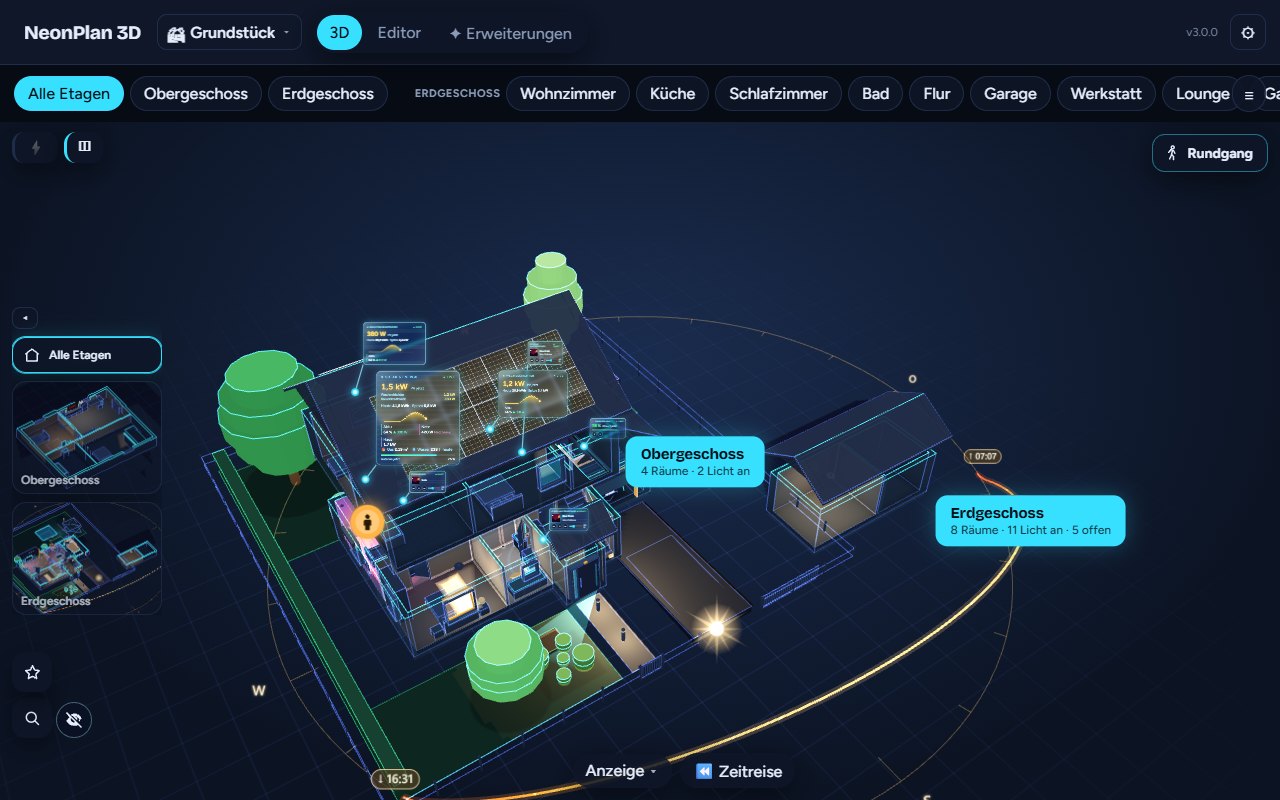
- See your whole property in 3D – every building where it really stands, lights, devices and warnings live.
🧸 Single rooms on your dashboard
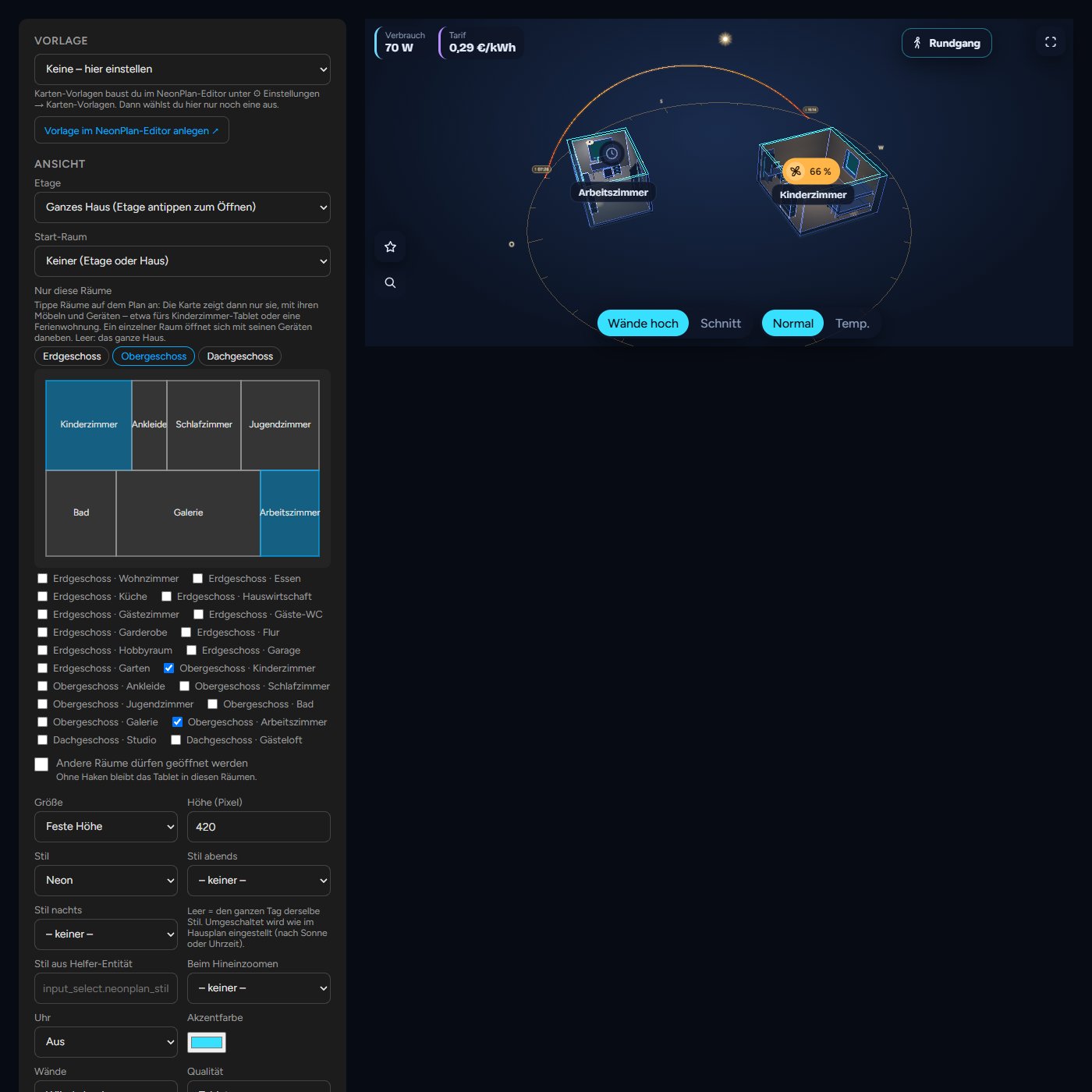
Many of you use NeonPlan next to other cards – Mushroom, tiles, your own dashboards. Now NeonPlan fits right in: a card that shows just one room, or the few rooms you pick.
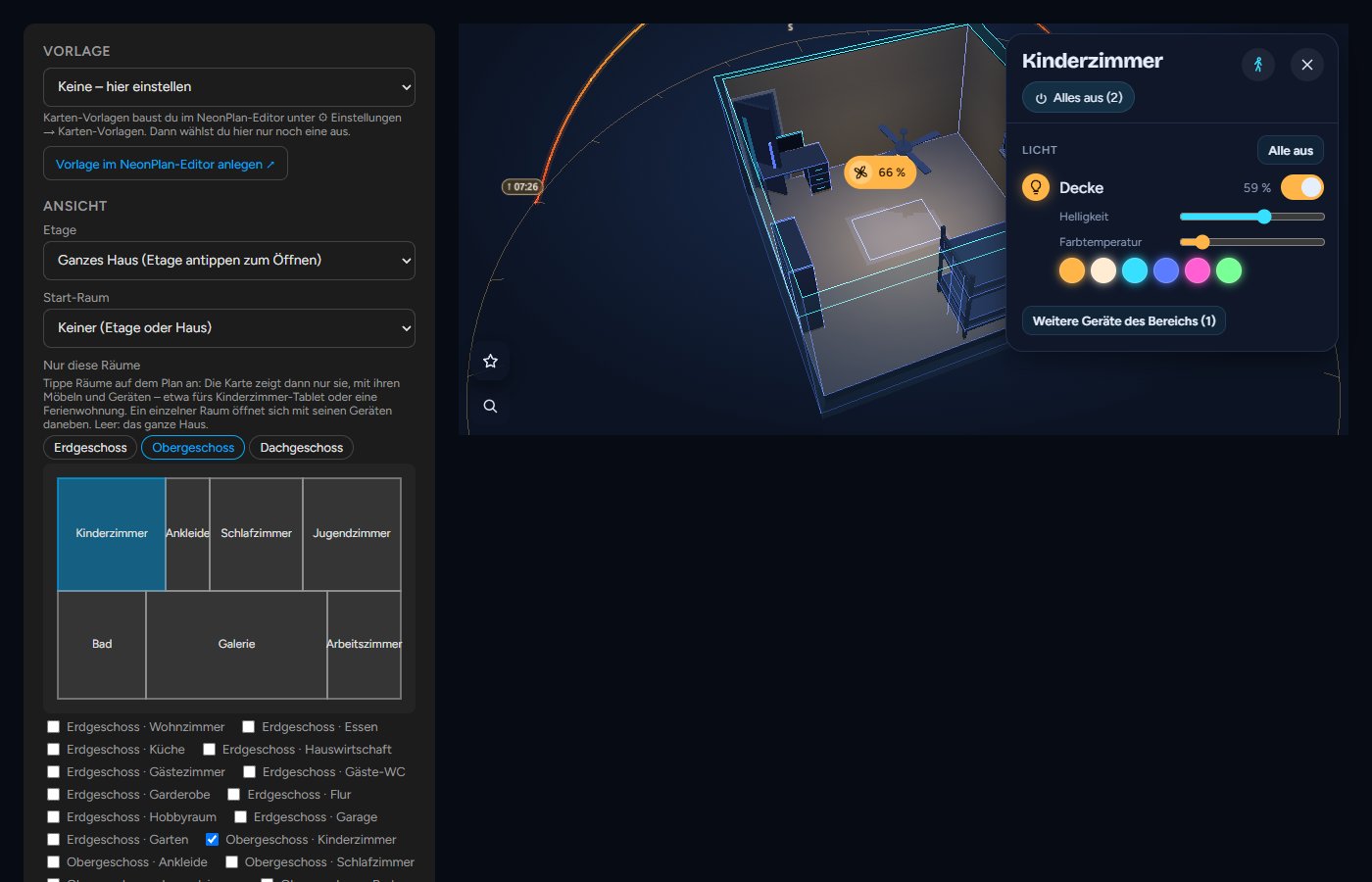
- Tap the rooms on a little map in the card dialog – done. The card shows only them, with their furniture, devices, doors and windows. Everything else is left out.
- One room opens with its devices beside it – lights, blinds, climate, media, at a tap.
- The kids' tablet shows the kids' room. The guest tablet the guest room. The granny flat its own flat. "Here" in voice control means that room.
- It stays there: taps and jumps don't lead out of the room – unless you allow it.
- One button in the editor: select a room → 🖥 Card for this room, and the card template is made for you.
- Runs even more smoothly on old wall tablets – only these rooms are drawn.
🏘️ Several houses and flats in one installation
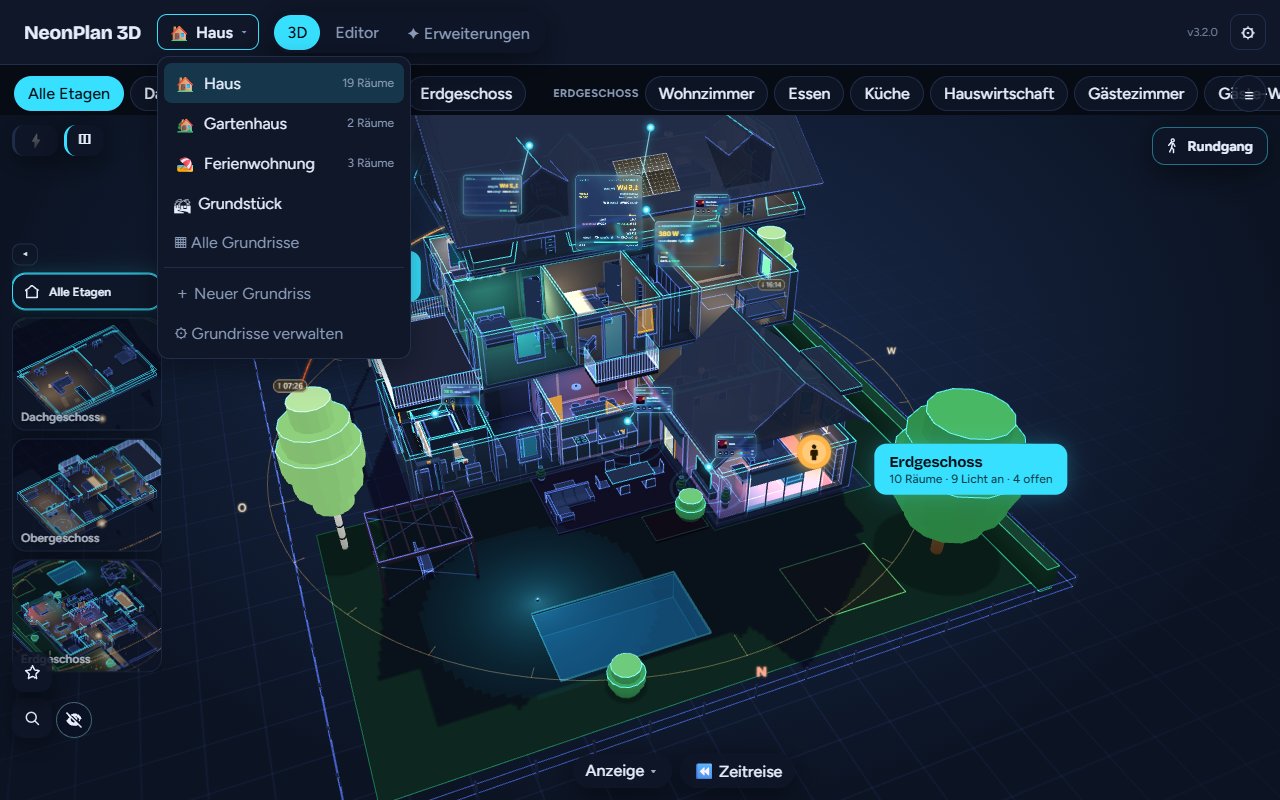
- A new floor plan in seconds – empty, as a copy of another, or from a file (also straight from the import page). It opens in the editor at once.
- Switch at the top: the picker sits next to the title, with + New floor plan right there.
- Each floor plan on its own – floors, rooms, devices, card templates and restore points.
- Nothing is lost: your plan so far simply stays the first one, untouched. A deleted floor plan waits 30 days in the bin.
🗺️ Your whole property in 3D
- Place the other buildings beside the house once: drag and turn them on a view from above.
- Every building keeps its own roof, its lights, devices and warnings.
- Tap a room of the garden house and you are in it.
- On the dashboard too: one card for the whole property.
⚠️ Warnings from everywhere
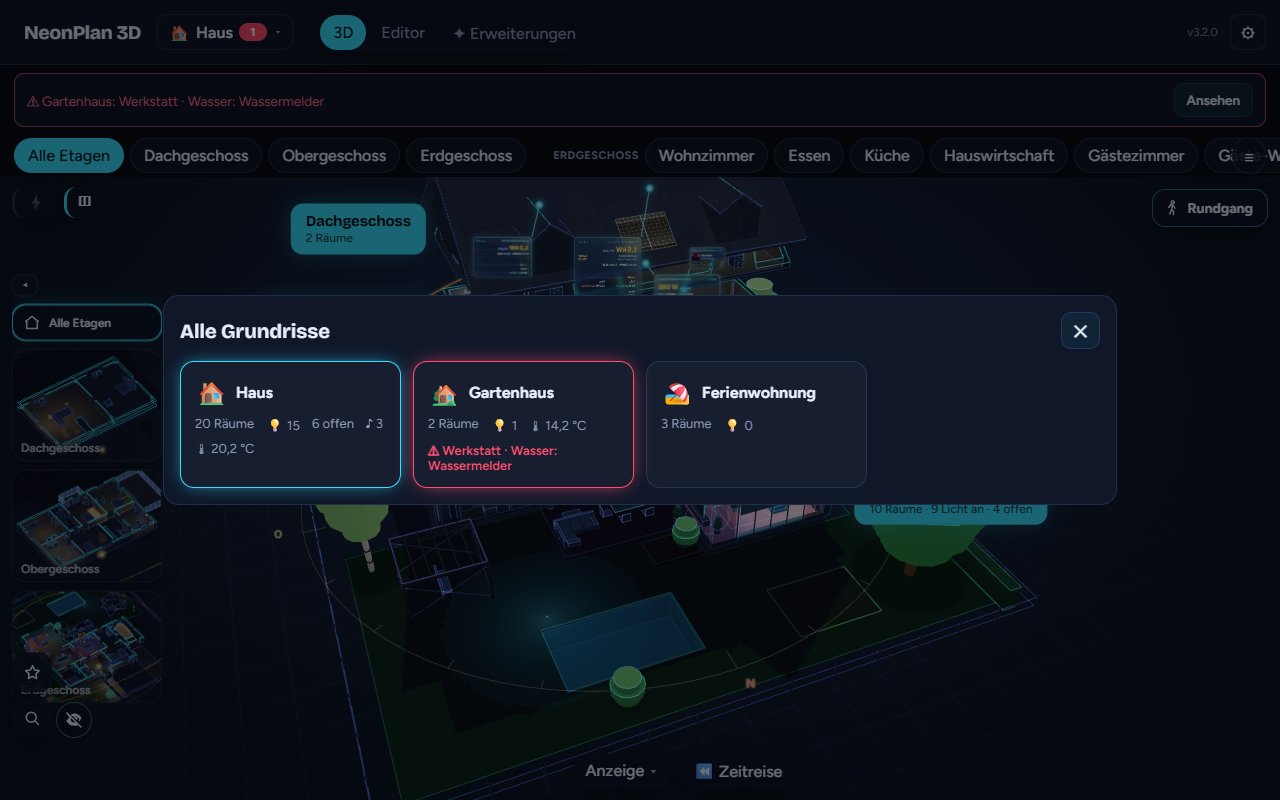
- Water in the garden house while the house is open? The warning shows at the top – one tap takes you into the room.
- All floor plans at a glance: a tile per building with the lights that are on, open windows and doors, the warmth and any warning.
Also new
- Announcements find their room in every floor plan – or in the one you name.
- The full backup carries every floor plan; older backups still restore.
- Live Presence works with the floor plan you choose.
How to start
- Restart Home Assistant once after the update.
- At the top, next to the title: + New floor plan.
- For a room card: in the editor select a room → 🖥 Card for this room, then pick the template on the tablet.
Everything is in the manual: chapter 4.25 Several floor plans and the property and 8.3 Cards for single rooms.
NeonPlan 3D 3.0 – das größte Update überhaupt
Jedes Haus. Jede Wohnung. Jeder einzelne Raum auf deinem Dashboard.
Das ist das größte Release in der Geschichte von NeonPlan – und alles davon ist kostenlos.
Es bringt den Wunsch, den ihr uns seit dem Start von NeonPlan am häufigsten geschickt habt: mehr als einen Grundriss zeichnen. Hier ist er – und noch einiges mehr.
Drei Dinge, die kein anderer Grundriss für Home Assistant kann. Kopien dürfen dem Original gern folgen – sie müssen nur erst mal hinterherkommen. 😉
- Mehrere Häuser und Wohnungen zeichnen – in einer Installation: das Haus, die Garage, das Gartenhaus, die Einliegerwohnung, die Ferienwohnung am Meer.
- Einzelne Räume auf dem Dashboard zeigen – als eigene Karte, direkt neben deinen anderen Karten.
- Dein ganzes Grundstück in 3D – jedes Gebäude da, wo es wirklich steht, mit Licht, Geräten und Warnungen live.
🧸 Einzelne Räume auf dem Dashboard
Viele von euch nutzen NeonPlan zusätzlich zu anderen Karten – Mushroom, Kacheln, eigene Dashboards. Jetzt passt NeonPlan genau dazwischen: eine Karte, die nur einen Raum zeigt, oder die paar Räume, die du auswählst.
- Räume auf einer kleinen Karte antippen – im Kartendialog, fertig. Die Karte zeigt nur sie, mit ihren Möbeln, Geräten, Türen und Fenstern. Alles andere fällt weg.
- Ein einzelner Raum öffnet sich mit seinen Geräten daneben – Licht, Rollläden, Klima, Medien, mit einem Tipp.
- Das Kinderzimmer-Tablet zeigt das Kinderzimmer. Das Gäste-Tablet das Gästezimmer. Die Einliegerwohnung ihre eigene Wohnung. „Hier“ in der Sprachsteuerung meint diesen Raum.
- Es bleibt dort: Tippen und Sprünge führen nicht aus dem Raum – außer du erlaubst es.
- Ein Knopf im Editor: Raum auswählen → 🖥 Karte für diesen Raum, und die Karten-Vorlage ist fertig.
- Läuft auf alten Wandtablets noch flüssiger – es werden nur diese Räume gezeichnet.
🏘️ Mehrere Häuser und Wohnungen in einer Installation
- Neuer Grundriss in Sekunden – leer, als Kopie eines anderen oder aus einer Datei (auch direkt von der Import-Seite). Er öffnet sich sofort im Editor.
- Oben wechseln: Die Auswahl sitzt neben dem Titel, + Neuer Grundriss gleich mit dabei.
- Jeder Grundriss für sich – Etagen, Räume, Geräte, Karten-Vorlagen und Wiederherstellungspunkte.
- Nichts geht verloren: Dein bisheriger Plan bleibt einfach der erste, unverändert. Ein gelöschter Grundriss wartet 30 Tage im Papierkorb.
🗺️ Dein ganzes Grundstück in 3D
- Die anderen Gebäude einmal neben das Haus stellen: auf einer Draufsicht ziehen und drehen.
- Jedes Gebäude behält sein eigenes Dach, seine Lichter, Geräte und Warnungen.
- Raum im Gartenhaus antippen – und du bist drin.
- Auch im Dashboard: eine Karte für das ganze Grundstück.
⚠️ Warnungen von überall
- Wasser im Gartenhaus, während das Haus offen ist? Die Warnung erscheint oben – ein Tipp bringt dich in den Raum.
- Alle Grundrisse auf einen Blick: eine Kachel pro Gebäude mit den Lichtern, die an sind, offenen Fenstern und Türen, der Temperatur und jeder Warnung.
Außerdem neu
- Durchsagen finden ihren Raum in jedem Grundriss – oder in dem, den du nennst.
- Das Komplett-Backup enthält alle Grundrisse; ältere Backups lassen sich weiter einspielen.
- Live Presence arbeitet mit dem Grundriss, den du wählst.
So geht's los
- Nach dem Update Home Assistant einmal neu starten.
- Oben neben dem Titel: + Neuer Grundriss.
- Für eine Raum-Karte: im Editor einen Raum auswählen → 🖥 Karte für diesen Raum, dann auf dem Tablet die Vorlage wählen.
Alles steht in der Anleitung: Kapitel 4.25 Mehrere Grundrisse und das Grundstück und 8.3 Karten für einzelne Räume.
4 November 2026 · v2.3.1
NeonPlan 3D 2.3.1 – two fixes
Fixed
- Blinds inside the room: an outer wall stored in several pieces could end up turned round, and the outside blind of a window on it was drawn inside the room. Thanks to @T-Eberle, who found it.
- "Switch devices only in the opened room": a swipe over a blind or lamp outside the opened room no longer moves it either – before, only taps were held back (#896, @RobertSorgenfrei).
No restart of Home Assistant needed – reload the page (or your tablets).
3 November 2026 · v2.3.0
🖥 New: edit all your wall tablets live – from the editor
Your dashboard cards now live in the NeonPlan editor. Build a card once, see it on a real tablet screen while you build it, and every tablet showing it follows – a new option, another floor, the clock switched on, voice control added. No ladder, no big form on a tiny tablet, no setting up every tablet again.

⚙ Settings → 🖥 Card templates:
- Live preview on the screen it is for: a 10″ or 7″ Fire tablet, a tablet upright or a phone – laid out exactly as there (the room panel beside the house on a tablet). "⤢ Large" shows it over the whole width.
- Straight to the tablets – or with a button: every change reaches every tablet with that template within a second, without a reload. Prefer to finish first? "Send with a button" keeps your changes in the preview until you press Send to the tablets.
- Where does the tablet hang? Pick its room, and "turn on the lights here" means that room.
- Duplicate a template for the next tablet; rename it, and tablets set up with the old name keep working.
On the tablet it is two lines: add the NeonPlan card, pick the template at the top – done.
type: custom:neonplan3d-card
template: kitchen_tablet

The card shows the template, only its size (fill the screen, height, full-screen button) stays the card's own. Old settings left on an existing card no longer get in the way – the dialog lists them and tidies them up. "Edit in the NeonPlan editor ↗" jumps straight to the template.
Reload every tablet from your chair
- "Reload screens with this template" or "Reload all screens" lets the wall tablets load their page again – after an update, new code reaches them without touching a single tablet. They say "Reloading …" and come back a few seconds apart.
- In automations: the new action
neonplan3d.reload_screens (e.g. every night at 4 am).
- Open screens: a list of every device NeonPlan is open on right now – "Fire HD 10 · Fully Kiosk", what it shows, since when, its version (an old one is marked) – each with a reload of its own.

Like everything in NeonPlan this runs on old, weak wall tablets too: a change is a tiny message, the tablet only updates what changed.
🧹 Vacuum and everything off – per room, also by voice

- 🧹 Vacuum: give a room the script or button that sends your robot there (editor → room → Cleaning); its panel gets 🧹 Vacuum.
- ⏻ Everything off: the room's lights, fans and TV off, playing speakers paused. Switched sockets only where a lamp hangs on them – the fridge never goes off.
- By voice: "vacuum here", "vacuum the kitchen", "everything off there". "there" is the room you tapped open, "here" the tablet's own room – tap into the living room on the kitchen tablet and say "turn off the lights there".
❄️ Fun pack Winter & Christmas (free)

- 11 decorations: a Christmas tree on its plug, an Advent wreath that lights its candles by date, a window star, a candle arch, a light-up reindeer, a snowman, presents, string lights and more.
- Fairy lights along the eaves – or the whole roof, gables and ridge – warm white or colourful, with your outdoor lights or by themselves from the first Sunday of Advent.
- Snow on the roof and the lawn while it snows; it stays while it freezes.
- A neon firework over your house at New Year's midnight.
- Free for every customer account: Extensions → install. Settings in the editor under ⚙ Settings → 🎈 Fun packs.
Also new
- "Only show while …" for every piece of furniture: decoration that appears with a helper or an automation – every December by itself.
- Fun pack settings now in the editor under ⚙ Settings → 🎈 Fun packs.
Fixed
- Walls under a hand-set overhang (#921) end under the roof. Thanks to @1970lexi!
- Blinds that only tilt (#920) open and close by their tilt. Thanks to @jsdray!
- Small items (#908) can be moved again. Thanks to @vincegre!
- Camera wedge (#901) turns red on motion alone. Thanks to @apalm8!
- Window light outside (#893) lies on the ground instead of vanishing. Thanks to @1970lexi!
- Dark band at the bottom of the card (#926) in sections dashboards: the house fills its cell. Thanks to @joelebanjo!
- Media cards (#911) also show in the opened room. Thanks to @frops83!
- Shift the floor (#894) says which way X and Z go. Thanks to @legospieler!
- Modules may light an item's top plate (#917). Thanks to @grzegorz914!
After updating: restart Home Assistant once (the new action and the screen list), then press "Reload all screens" – from now on that is all it takes.
🖥 Neu: alle Wand-Tablets live aus dem Editor bearbeiten
Deine Dashboard-Karten wohnen jetzt im NeonPlan-Editor. Eine Karte einmal bauen, dabei schon auf echtem Tablet-Bildschirm sehen, wie sie aussieht, und jedes Tablet mit dieser Karte zieht mit: eine neue Option, eine andere Etage, die Uhr an, Sprachsteuerung dazu. Keine Leiter, kein Riesenformular auf dem kleinen Tablet, kein Tablet mehr einzeln einrichten.

⚙ Einstellungen → 🖥 Karten-Vorlagen:
- Live-Vorschau auf dem richtigen Bildschirm: Fire-Tablet 10″ oder 7″, hochkant oder Handy, genau so angeordnet wie dort (auf dem Tablet das Raumfenster neben dem Haus). „⤢ Groß“ zeigt sie über die ganze Breite.
- Sofort auf die Tablets – oder per Knopf: Jede Änderung ist in einer Sekunde auf jedem Tablet mit dieser Vorlage, ohne Neuladen. Lieber erst fertig machen? Bei „Erst mit Knopf übertragen“ sieht nur die Vorschau deine Änderungen, bis du Auf Tablets übertragen drückst.
- Wo hängt das Tablet? Raum wählen, dann gilt „Mach hier das Licht an“ für diesen Raum.
- Duplizieren für das nächste Tablet; umbenennen geht, Tablets mit dem alten Namen laufen weiter.
Auf dem Tablet sind es zwei Zeilen: NeonPlan-Karte hinzufügen, oben die Vorlage wählen, fertig.
type: custom:neonplan3d-card
template: kuechen_tablet

Die Karte zeigt die Vorlage, nur ihre Größe (Bildschirm füllen, Höhe, Vollbild-Knopf) behält sie selbst. Alte Einstellungen an einer bestehenden Karte stören nicht mehr: Der Dialog zeigt sie an und räumt sie auf. „Im NeonPlan-Editor bearbeiten ↗“ springt direkt zur Vorlage.
Alle Tablets vom Sofa aus neu laden
- „Bildschirme mit dieser Vorlage neu laden“ oder „Alle Bildschirme neu laden“ lässt die Wand-Tablets ihre Seite neu laden. Nach einem Update kommt der neue Code so an, ohne ein einziges Tablet anzufassen. Sie zeigen „Lädt neu …“ und kommen ein paar Sekunden versetzt wieder.
- In Automationen: die neue Aktion
neonplan3d.reload_screens (zum Beispiel jede Nacht um 4 Uhr).
- Offene Bildschirme: eine Liste aller Geräte, auf denen NeonPlan gerade offen ist – „Fire HD 10 · Fully Kiosk“, was es zeigt, seit wann, welche Version (alte werden markiert) –, jedes mit eigenem Neu-laden-Knopf.

Wie alles in NeonPlan läuft das auch auf alten, schwachen Wand-Tablets: Eine Änderung ist eine winzige Nachricht, und das Tablet erneuert nur, was sich geändert hat.
🧹 Saugen und Alles aus – pro Raum, auch per Sprache

- 🧹 Saugen: Gib einem Raum das Skript oder den Knopf, der deinen Roboter dorthin schickt (Editor → Raum → Reinigung); sein Raumfenster bekommt 🧹 Saugen.
- ⏻ Alles aus: Lichter, Ventilatoren und Fernseher des Raums aus, laufende Lautsprecher pausiert. Steckdosen nur, wenn eine Lampe daran hängt – der Kühlschrank geht nie aus.
- Per Sprache: „Saug hier“, „Saug die Küche“, „Mach da alles aus“. „da“ ist der angetippte Raum, „hier“ der Raum des Tablets: Auf dem Küchentablet ins Wohnzimmer tippen und „Mach da das Licht aus“ sagen.
❄️ Fun-Pack Winter & Weihnachten (gratis)

- 11 Deko-Möbel: Weihnachtsbaum an der Steckdose, ein Adventskranz, der seine Kerzen nach Datum anzündet, Fensterstern, Schwibbogen, Leucht-Rentier, Schneemann, Geschenke, Lichterketten und mehr.
- Lichterkette an der Dachkante – oder am ganzen Dach mit Giebeln und First –, warmweiß oder bunt, mit deiner Außenbeleuchtung oder von selbst ab dem 1. Advent.
- Schnee auf Dach und Rasen, solange es schneit; bei Frost bleibt er liegen.
- Neon-Feuerwerk über deinem Haus an Silvester um Mitternacht.
- Gratis für jedes Kundenkonto: Erweiterungen → installieren. Einstellungen im Editor unter ⚙ Einstellungen → 🎈 Fun-Packs.
Außerdem neu
- „Nur zeigen, wenn …“ für jedes Möbel: Deko, die mit einem Helfer oder einer Automation erscheint – jeden Dezember von selbst.
- Fun-Pack-Einstellungen jetzt im Editor unter ⚙ Einstellungen → 🎈 Fun-Packs.
Behoben
- Wände unter Dachüberstand (#921) enden unter dem Dach. Danke an @1970lexi!
- Lamellen-Rollos (#920) öffnen und schließen über die Neigung. Danke an @jsdray!
- Kleine Möbel (#908) lassen sich wieder verschieben. Danke an @vincegre!
- Kamera-Kegel (#901) wird schon bei Bewegung rot. Danke an @apalm8!
- Fensterlicht draußen (#893) liegt auf dem Boden, statt zu verschwinden. Danke an @1970lexi!
- Dunkler Streifen unten in der Karte (#926) in Abschnitts-Dashboards: Das Haus füllt sein Feld. Danke an @joelebanjo!
- Medien-Karten (#911) auch im geöffneten Raum. Danke an @frops83!
- Etage verschieben (#894) sagt, wohin X und Z gehen. Danke an @legospieler!
- Module dürfen die Oberseite eines Möbels leuchten lassen (#917). Danke an @grzegorz914!
Nach dem Update: Home Assistant einmal neu starten (neue Aktion und Bildschirm-Liste), dann „Alle Bildschirme neu laden“ drücken – ab jetzt reicht dieser Knopf.
1 November 2026 · v2.2.0
🖨 New: print your NeonPlan home in 3D (supporter beta)
Your house as a 3D print – floors you lift off, the roof as a lid, a base plate with your name. Upload your plan at print.mastershort.de, turn the model in your browser, download the print files and a step-by-step guide.

- For Supporter-Pass holders, free during the beta until 30 November 2026 – up to 3 houses, corrections as often as you like.
- In NeonPlan: Extensions → "Open NeonPlan Print" copies your supporter code; in the editor, "🖨 Print in 3D" next to "Export plan" downloads your plan and opens the page.
- Tell us how it went: "Feedback & bugs" right on the print page.
- Private, non-commercial use for your own homes.

New
- Gates in fences (#818): garden, double and sliding gates in your fence – they open in 3D with their opener, a tap switches them. Thanks to @fammastrodaiuto!
- Floor plan only: "Show" → "Floor plan only" hides the furniture; walls, doors, windows and your devices stay. Also as a card option.
- Right click goes back (⚙ Settings → Controls, off by default).
- Sloping free walls (#834): a wall drawn with the wall tool can now slope like a room wall. Thanks to @daene85!
- Overhang per side (#863): set a roof section's overhang side by side.
- Sun arc around the whole plot (#833): for large plots, in ⚙ Settings → Look. Thanks to @grzegorz914!
- Cable hub of your own (#841, Energie Pro): for a meter at the grid connection, far from the house board. Thanks to @grzegorz914!

Fixed
- Floor openings in split levels (#813). Thanks to @PhilWil91!
- Light wells under a raised path or lawn, with an adjustable depth (#890). Thanks to @1970lexi!
- Terrace roofs no longer poke into the house at thick walls (#863). Thanks to @daene85!
- Sun patches are soft and warm instead of grey blocks (#819). Thanks to @LucidityCrash!
- Heatmap colours are right again with an own accent colour (#558). Thanks to @frops83!
After updating, restart Home Assistant once.
31 October 2026 · v2.1.0
New
- Voice control knows where the tablet hangs: give a wall tablet its room (⚙ Settings → 🎙 Voice control → Room of this device; on a dashboard: card → Features → Room for "here", or
voice_area: <area id> in YAML). Then sentences without a room name are enough: "Lights on", "Turn off the lights here" or "Close the blinds" switch only in that room. A room you name still wins. Empty by default – nothing changes until you choose a room. After updating, restart Home Assistant once.
- Slovenčina – Slovak (#870): NeonPlan now speaks Slovak, its 19th language. Thanks to @Havinko1991!
- The size of the glass cards for everyone: ⭐ → ⚙ Settings → Look → "Size of the glass cards" makes the energy, heat pump, car and device cards larger or smaller – before, only the Energie Pro settings offered it.
- More of the dashboard card without YAML: the card's visual editor now offers the start room, the 3D lock, keep view, the walk on or off, the controls left or right, and the time travel's range and speed.
Fixed
- The attic no longer stands out of the roof as a step (#855): a wall of a high attic floor along the eaves stood out of the roof along its whole length once it turned opaque; it now ends where the roof passes through it. Thanks to @Kuddelsoft for the plan!
- "Switch devices only in the opened room" is easy to find (#883): it sat only in the ⚙ menu of the 3D view (⭐ → ⚙ Settings → Controls); now it is in the editor too (⚙ Settings → Weather & warnings). Thanks to @PaulBiod!
- Colour effects no longer slow the 3D view (#885): a light running an effect made the view crawl, even on fast computers. Now the light on floors and walls is computed once and only recoloured, and the effect holds while you turn or zoom. Thanks to @kzaoaai!
- A shared template leaves out every link to your home: "Share as template" now also removes the entities of newer features (door locks, gas and water meters, rain and outage sensors, extra entities of furniture), wherever they stand in the plan. Thanks to @Kuddelsoft for noticing!
- Card: the "values" heatmap is a valid card option, and the "Extensions" button in a Pro hint opens the extensions in the NeonPlan panel.
Neu
- Die Sprachsteuerung weiß, wo das Tablet hängt: Gib einem Wandtablet seinen Raum (⚙ Einstellungen → 🎙 Sprachsteuerung → Raum dieses Geräts; auf einem Dashboard: Karte → Funktionen → Raum für „hier“, oder
voice_area: <Bereichs-ID> im YAML). Dann reichen Sätze ohne Raumnamen: „Licht an“, „Mach hier das Licht aus“ oder „Rollladen runter“ schalten nur in diesem Raum. Nennst du einen Raum, gilt der genannte. Ab Werk leer – es ändert sich nichts, bis du einen Raum wählst. Nach dem Update Home Assistant einmal neu starten.
- Slovenčina – Slowakisch (#870): NeonPlan spricht jetzt Slowakisch, seine 19. Sprache. Danke an @Havinko1991!
- Die Größe der Glas-Kacheln für alle: ⭐ → ⚙ Einstellungen → Darstellung → „Größe der Glas-Kacheln“ macht die Kacheln für Energie, Wärmepumpe, Auto und Geräte größer oder kleiner – bisher ging das nur in den Energie-Pro-Einstellungen.
- Mehr von der Dashboard-Karte ohne YAML: Der Karten-Editor bietet jetzt Start-Raum, 3D-Sperre, Ansicht halten, Rundgang an oder aus, Bedienleiste links oder rechts sowie Zeitraum und Tempo der Zeitreise.
Behoben
- Der Spitzboden ragt nicht mehr als Stufe aus dem Dach (#855): Eine Wand eines hohen Spitzbodens an der Traufe stand über die ganze Länge aus dem Dach, sobald sie undurchsichtig wurde; jetzt endet sie dort, wo das Dach sie schneidet. Danke an @Kuddelsoft für den Plan!
- „Geräte nur im geöffneten Raum schalten“ ist leicht zu finden (#883): Die Einstellung stand nur im ⚙-Menü der 3D-Ansicht (⭐ → ⚙ Einstellungen → Bedienung); jetzt steht sie auch im Editor (⚙ Einstellungen → Wetter & Warnungen). Danke an @PaulBiod!
- Lichteffekte bremsen die 3D-Ansicht nicht mehr (#885): Eine Lampe mit laufendem Effekt hat die Ansicht ausgebremst, sogar auf schnellen Rechnern. Jetzt wird das Licht auf Böden und Wänden einmal berechnet und nur noch umgefärbt, und beim Drehen oder Zoomen pausiert der Effekt. Danke an @kzaoaai!
- Eine geteilte Vorlage enthält keine Verbindung mehr zu deinem Zuhause: „Als Vorlage teilen“ entfernt jetzt auch die Entitäten neuerer Funktionen (Türschlösser, Gas- und Wasserzähler, Regen- und Stromausfall-Sensor, Zusatz-Entitäten an Möbeln), egal wo sie im Plan stehen. Danke an @Kuddelsoft für den Hinweis!
- Karte: Die Heatmap „Werte“ ist eine gültige Karten-Option, und der Knopf „Erweiterungen“ in einem Pro-Hinweis öffnet die Erweiterungen im NeonPlan-Panel.
31 October 2026 · v2.0.11
New
- Switch devices only in the opened room (⚙ Settings → Controls, off by default): in the house and floor views, a tap on a device opens its room instead of switching it. A tap meant for a floor no longer moves a blind by accident. Inside the opened room everything switches as before, and a long press still opens the menu everywhere. After updating, restart Home Assistant once before you change the setting.
Fixed
- Power strips and multi-gang sockets switch again (#868): the menu of a socket or wall switch with several gangs showed its buttons, but a tap went through them. Thanks to @legospieler!
- Announcements on Echos of Home Assistant's own Alexa Devices integration (#865): such an Echo now announces through its own announce notify entity instead of text-to-speech, which it cannot play. This applies to the
neonplan3d.announce action now and to the room sheet with the next Announcements release. Thanks to @wh1tetiger for the detailed report!
- Announcements on the terrace (#866): an outdoor area with a Home Assistant area counts as a room for announcements, so the speaker there gets its 📢 too (with the next Announcements release). Thanks to @daene85!
30 October 2026 · v2.0.10
NeonPlan 3D 2.0.10 – 🔧 Fixes in plan and 3D
A small update with fixes you reported – thank you all!
- Light wells in thicker cellar walls (#843): a cellar window in a wall thicker than the settings' outer walls gets its light well again, right in front of that wall. Thanks to @RkcCorian and @1970lexi!
- Fog stays outside (#854): with fog switched on (⚙ Settings → Weather effects in 3D), it now lies around the house – the rooms and their lights stay clear, the surroundings fade. Thanks to @frops83!
- Turned roof sections can be resized (#856): a roof section turned by any angle – also 180° for a pent roof sloping the other way – shows its corner handles again; dragging one keeps the opposite corner in place. Thanks to @frops83!
- A camera's look at the camera's height (#779): the furniture item that shows a camera hangs where the camera is (under the ceiling for a ceiling camera) and follows when you change its height; the built-in camera model goes at once. Thanks to @EduK85!
- The sidebar jumps to what you tap (#837): choosing a door, a garage door, an item or a room in the plan scrolls the editor's sidebar up to its form. Thanks to @golfinho24!
Still runs smoothly on old wall tablets. Found something? Please open an issue.
NeonPlan 3D 2.0.10 – 🔧 Korrekturen in Plan und 3D
Ein kleines Update mit Korrekturen, die ihr gemeldet habt – danke euch allen!
- Lichtschächte in dickeren Kellerwänden (#843): Ein Kellerfenster in einer Wand, die dicker ist als die Außenwände aus den Einstellungen, bekommt seinen Lichtschacht wieder – direkt vor dieser Wand. Danke an @RkcCorian und @1970lexi!
- Nebel bleibt draußen (#854): Eingeschalteter Nebel (⚙ Einstellungen → Wetter-Effekte in 3D) liegt jetzt um das Haus herum – Räume und Lichter bleiben klar, die Umgebung verschwimmt. Danke an @frops83!
- Gedrehte Dachflächen wieder in der Größe änderbar (#856): Eine gedrehte Dachfläche – auch um 180° für ein Pultdach in die andere Richtung – zeigt wieder ihre Eckpunkte; beim Ziehen bleibt die gegenüberliegende Ecke stehen. Danke an @frops83!
- Das Möbel-Aussehen einer Kamera auf Kamerahöhe (#779): Das Möbelstück, das eine Kamera darstellt, hängt dort, wo die Kamera ist (bei einer Deckenkamera unter der Decke), und wandert mit, wenn du die Höhe änderst; das eingebaute Kameramodell verschwindet sofort. Danke an @EduK85!
- Die Seitenleiste springt zum angetippten Teil (#837): Wählst du im Plan eine Tür, ein Garagentor, ein Möbel oder einen Raum, scrollt die Seitenleiste des Editors hoch zu seinem Formular. Danke an @golfinho24!
Läuft weiter flüssig auf alten Wand-Tablets. Etwas gefunden? Bitte als Issue melden.
29 October 2026 · v2.0.9
NeonPlan 3D 2.0.9 – 📢 The doorbell rings, and your house says it
Announcements now work from automations – and every NeonPlan screen speaks too. Your old wall tablet becomes an announcement speaker, with no extra hardware and nothing to set up in Home Assistant.

📢 New: the action "NeonPlan 3D: Announcement"
Use it in any automation, script or button: the doorbell rings, the washing machine is done, the kids should come down for dinner.
- On the NeonPlan screens: every open NeonPlan screen plays a soft chime, speaks the message itself and shows it big over the plan. A Fire tablet on the wall, an old iPad, the PC – wherever NeonPlan is open. Or only the screens you name ("Hallway").
- On the rooms' speakers: to every room, to rooms by name, or to one floor. Each room uses its own speaker – the one you chose, the one placed in the room on the plan, or one of its area. Echos announce with their chime, Sonos lowers the music and plays on after.
- Quiet time is respected: the nursery from 8 pm? Announcements to several rooms leave it out.
- Works with no NeonPlan page open for the speakers – it runs right in Home Assistant.
action: neonplan3d.announce
data:
  message: "Someone is at the door!"
  on_screens: true
  rooms: [Kitchen, Living room]
Tip for wall tablets: browsers play sound only after a first tap on the page. In Fully Kiosk switch on Autoplay Audio under Web Content Settings, and the tablet speaks right away. Speaking on the screens uses a voice pipeline with text-to-speech in Home Assistant.
The action needs the Announcements module – still in beta, for Supporter Pass holders first. Without the module the action tells you so.
Still runs smoothly on old wall tablets – in fact, now they talk. Found something? Please open an issue.